Boyum Help Center Help Center home page
Boyum IT Solutions Community Submit a request
Sign in
  1. Boyum Help Center
  2. General Information
  3. Sales and Portal Questions

How to settle overdue payments

  • Updated February 09, 2018 19:35

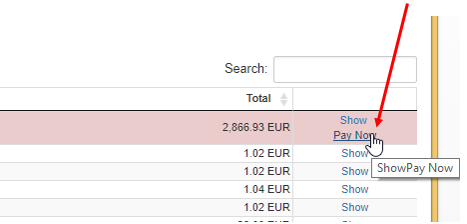
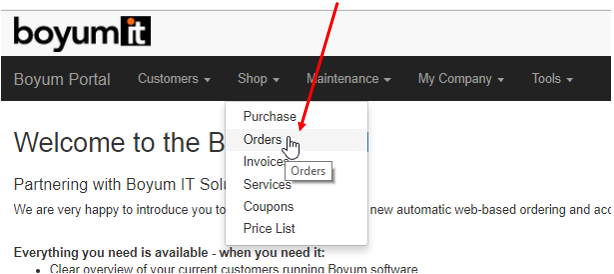
You can settle overdue invoices in the Boyum Portal. Go to "Shop" -> "Orders" -> "Pay now" using online payment.

Was this article helpful?

0 out of 0 found this helpful

Related articles

  • Missing wire payment option in the Boyum Portal
  • How to look up an invoice copy in the Boyum Portal
  • Crystal report - performance
  • Webinar recordings
  • SAP Issue - Cloud Control Center - Please check the disk space or permissions

Comments

0 comments

Please sign in to leave a comment.
Articles in this section

  • Planned Portal Upgrade - Important notice for your partners
  • How to use the new Subscriptions Renewal Forecast Report
  • Introducing subscriptions (FAQs)
  • How to purchase Subscriptions in the Portal
  • How to add more subscriptions with the same end date to the existing one
  • Who can renew maintenance?
  • How to settle overdue payments
  • Missing wire payment option in the Boyum Portal
  • How to change password in the Boyum Portal
  • How to create a quotation in the Boyum Portal

See all 23 articles

Boyum IT Solutions
Español (Latinoamérica)
Zendesk Theme by Zenplates