Boyum Help Center Help Center home page
Boyum IT Solutions Community Submit a request
Sign in
  1. Boyum Help Center
  2. General Information
  3. Guides, how to and information

How to grant needed permissions to work with SAP Series

  • Updated November 19, 2021 12:21

In SAP Business One you can work with series of various kinds:

- Document Series
- Business Partner Series
- Item Series
- etc.

In order for add-ons (B1UP - Quick Create and CRMFO) to work with these series the SAP user need the following Authorizations in order for this to work (Requirement from the SDK) 
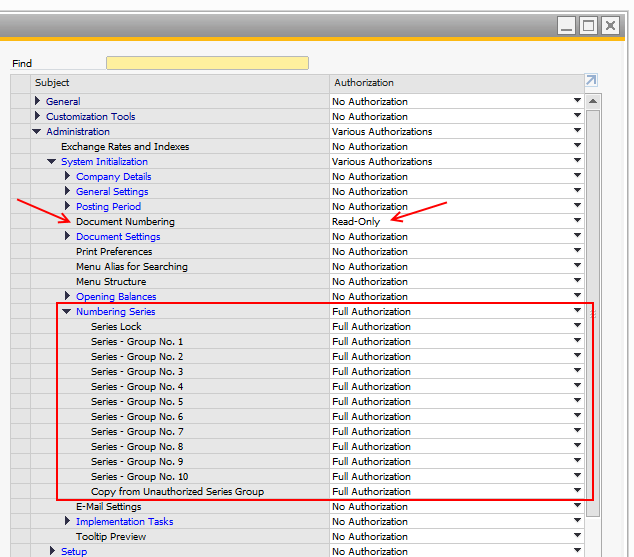
NeededPermissions.png


Was this article helpful?

0 out of 0 found this helpful

Related articles

  • SAP Issue - SQL Server limitation for row data length (8060 bytes)
  • SAP DI-API Error "100000048 - No SAP licenses"
  • Errors around Numbering series in CRM for Outlook and how to fix them
  • SAP Issue: -8037 - Failed to connect or logon to SLD / -4008 - Login SLD Failed / -4009 - Login SLD Failed
  • How to create Program Group and assign to an user in Beas

Comments

0 comments

Please sign in to leave a comment.

Articles in this section

  • Authentication service change across Boyum products
  • B1 InterCompany E-Learning Content
  • Boyum Products and SAP Hosted Cloud Support (B1 Cloud)
  • How Boyum works with Feature Requests (FRQs)
  • How to become a Boyum partner?
  • How to join our Product Community
  • Planned supported SAP versions from 2022 (6 Months early warning)
  • Produmex Products on Multi-Tenant Environment
  • SAP Business One 10 Web Client vs Boyum Add-ons
  • Support ticket escalation – How and when to escalate

See all 91 articles

Boyum IT Solutions
Español (Latinoamérica)
Zendesk Theme by Zenplates