Boyum Help Center Help Center home page
Boyum IT Solutions Community Submit a request
Sign in
  1. Boyum Help Center
  2. Produmex WMS
  3. How-to

How to Get an Overview of the Open Amount of Clients/Suppliers on a Certain Date

  • Updated January 11, 2022 07:23

Example:

It is necessary to have an overview of the account balances and open amounts for all the customers/suppliers before 31/12/2015.

Solution:

Financial / Financial Reports / Accounting / General Ledger
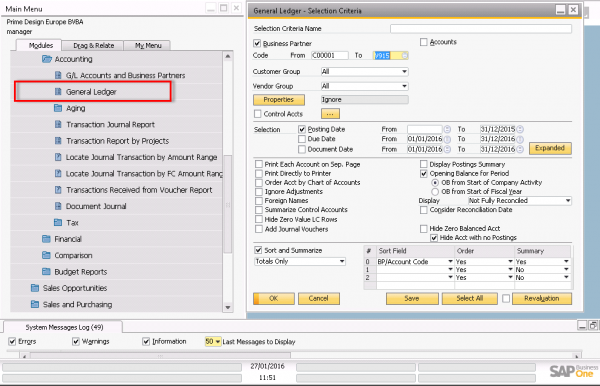
1.png

You get an overview of the open balance for each client/supplier.
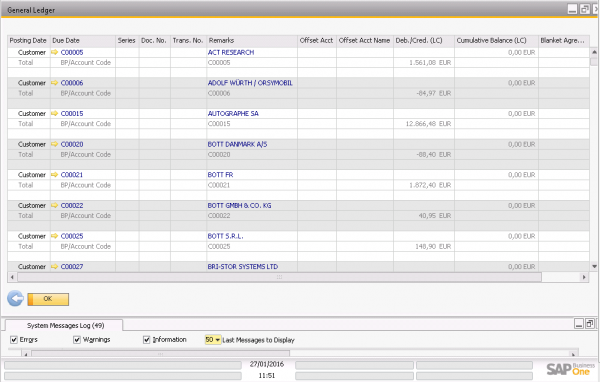
2.png

You can export this to excel.

3.png

Was this article helpful?

0 out of 0 found this helpful

Related articles

  • How to work with Copy from and Copy to buttons on sales and purchase documents
  • Updating Account Balance Crystal layout, to Work with Vendors B1UP (2019.04 or higher)
  • How to update header level fields in SAP B1 using Produmex scan
  • How to Optimize Database Performance on HANA
  • How to Print Documents with a Batch File

Comments

0 comments

Please sign in to leave a comment.

Articles in this section

  • WMS stock information examples in SAP Business One Web client
  • How to Generate Google API Key
  • How to Set Up WMS to Use Logistics Carriers during Picking
  • Launch Produmex WMS tools from SAP Business One Client
  • How to prepare Produmex WMS import files for OSE structure
  • How to create a WMS test environment
  • Setup WMS system to split picklists between full and partial pick quantities
  • How to use Line level remark customoization option for Reception flow in Produmex WMS
  • How to Set Up a print Filter for a Print Event with one parameter
  • How to use archiving in Produmex WMS

See all 31 articles

Boyum IT Solutions
Español (Latinoamérica)
Zendesk Theme by Zenplates