Boyum Help Center Help Center home page
Boyum IT Solutions Community Submit a request
Sign in
  1. Boyum Help Center
  2. B1 Usability Package
  3. Print and Delivery

Why is some of my characters in my B1 Print and Delivery Filenames turned into underscores _ ?

  • Created June 03, 2019 14:55

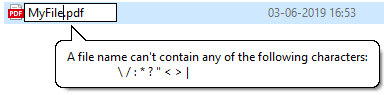
This happens because Filenames can't contain certain special chars. You also see that in Windows if you try to use them.
mceclip0.png

On top of the above chars, we also do not allow chars @ ( and ) as these can cause trouble when sending as email

Was this article helpful?

0 out of 0 found this helpful

Related articles

  • Guide - How do have B1P&D do two different Reports/actions for Item and Service Based Documents?
  • FAQ - B1 Print and Delivery
  • B1 Print and Delivery - Advanced Customization Topics
  • FAQ: Can B1 Print and Delivery send to a Fax machine
  • Guide - Adding a logo to a HTML body

Comments

0 comments

Please sign in to leave a comment.

Articles in this section

  • FAQ - B1 Print and Delivery
  • B1 Print & Delivery does not support Document Status "Open; E-mailed" and "Open: Printed and E-Mailed"
  • B1 Print & Delivery - E-Learning - How to consume?
  • How do I use Office365 for SMTP in the server component wizard?
  • How to use Office 365 Exchange Modern Authentication
  • B1 Print and Delivery - Advanced Customization Topics
  • Why is some of my characters in my B1 Print and Delivery Filenames turned into underscores _ ?
  • Guide - How do have B1P&D do two different Reports/actions for Item and Service Based Documents?
  • Guide - Generating a Right to Left (RTL) HTML Email in B1 Print and Delivery
  • How to troubleshoot using Delivery log and Error log information?

See all 55 articles

Boyum IT Solutions
Español (Latinoamérica)
Zendesk Theme by Zenplates