If you use Item Placement Tool custom tabs in either Item Master data or Business Partner Master data forms, you will notice that you're missing SAP's own system tabs if you open the forms from the main menu.
This is unfortunately an SAP bug in version Business One 10 PL 2011 (SQL/HANA).
The problem has been informed to SAP and we're waiting for their fix. Any updates on the issue will be added to this article.
UPDATE 11.12.2020
SAP is aware of this issue and we're waiting for an answer. The same problem occurs with SAP's own UI tools.
Update 21.01.2021
SAP Have informed us that the issue will be fixed in SBO 10 FP2102 (Start March 2021)
Update 4.2.2021
SAP has released a hotfix for version FP2011. Unfortunately, this fix doesn't work 100% and there are still some issues:
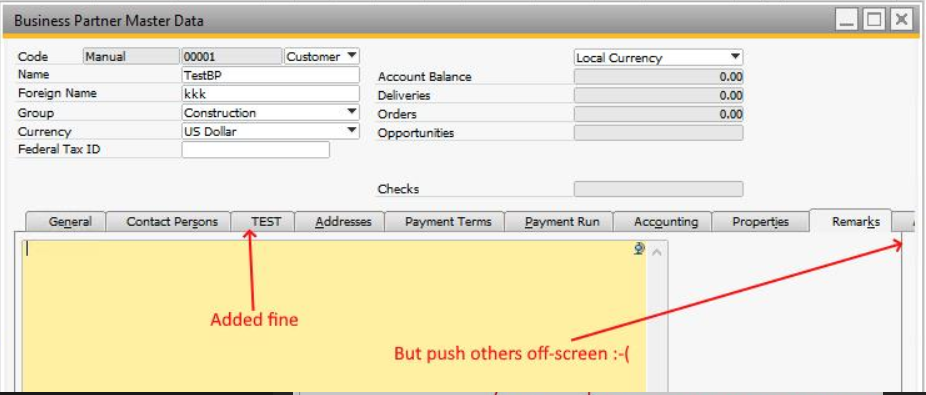
1) After the hotfix, the tabs do appear, but the other tabs are pushed outside the form.
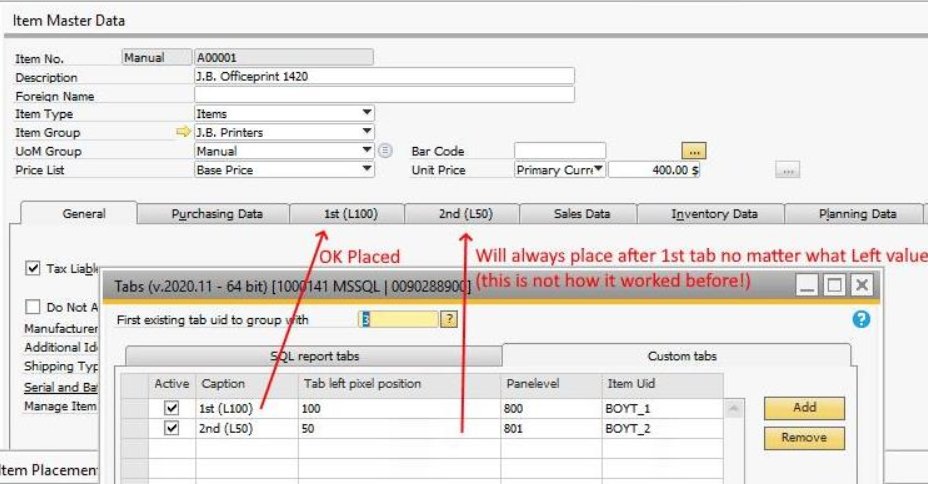
2) The 2nd tab will always be placed next to the first one no matter what Left-value you give it:
Comments
0 comments
Please sign in to leave a comment.