Q: What is the issue?
Bank of Australia has switched (2020) to require TLS 1.2 in their HTTPS calls, and all older version of B1UP does not support this. Customers will need to upgrade to B1UP 2018.8 which is the first version we have that supports TLS 1.2.
You will receive an error like this when logging in to SAP Business One:
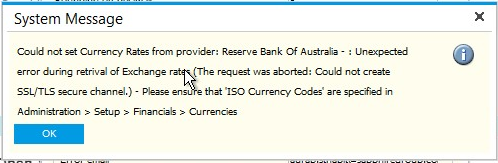
"Reserver Bank Of Australia - : Unexpected error during retrival of Exchange rates (The request was aborted: Could not create SSL/TLS secure channel.)"
Q: What can you do about it?
You have two options to fix this:
1. Update B1UP to 2018.08 or newer
2. Change the exchange rate provider
3. Force .NET Framework to use TLS 1.2 via the Windows Registry: You can read how to do it here (Enable strong cryptography in .NET Framework 4.5 or higher) - On Older Windows Servers you need to follow this guide as well to enable it on OS Level: https://support.microsoft.com/en-us/help/3140245/update-to-enable-tls-1-1-and-tls-1-2-as-default-secure-protocols-in-wi
Comments
1 comment
The article mentioned has 2 sections...is it the changes in Section 1 that are required and should these be done on the client or the server running the Boyum Server Components.
Windows Registry Editor Version 5.00 [HKEY_LOCAL_MACHINE\\SOFTWARE\\Microsoft\\.NETFramework\\v4.0.30319] "SchUseStrongCrypto"=dword:00000001 [HKEY_LOCAL_MACHINE\\SOFTWARE\\Wow6432Node\\Microsoft\\.NETFramework\\v4.0.30319] "SchUseStrongCrypto"=dword:00000001
Please sign in to leave a comment.