Boyum Help Center Help Center home page
Boyum IT Solutions Community Submit a request
Sign in
  1. Boyum Help Center
  2. CRM for Outlook
  3. Client (Outlook Add-in)

My Business One password has changed?

  • Updated November 19, 2021 11:21

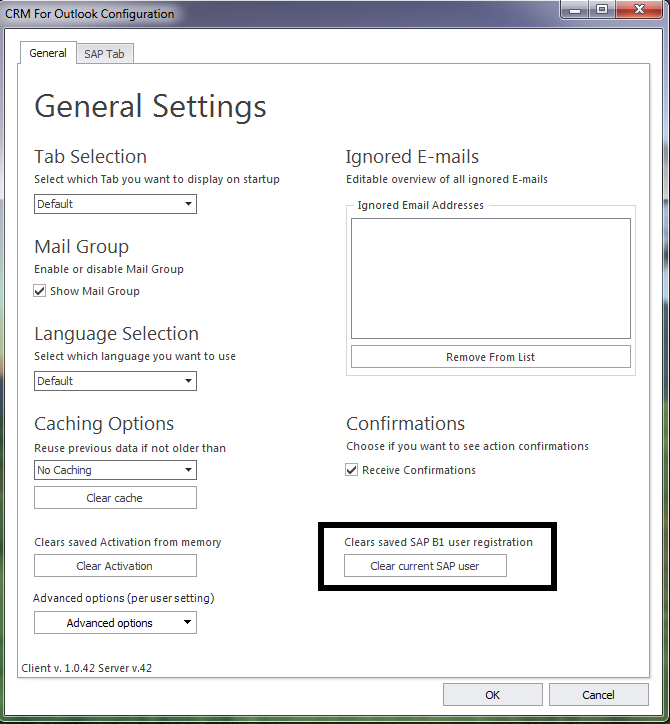
On the Context Ribbon press the "Settings" button.

On the configuration form, click the "Clear current SAP user" button.


Was this article helpful?

0 out of 0 found this helpful

Related articles

  • How to reset SAP B1 credentials in CRM for Outlook
  • SAP Issue - Wrong executable digital signature for Add-on
  • What changes are needed in B1 Usability Package is you need to change the Database password
  • CRM for Outlook - Error -132: Connection to license server is not authenticated
  • Beas Manufacturing 2025.06 (June 2025)

Comments

0 comments

Please sign in to leave a comment.

Articles in this section

  • Getting error: "No Database access" or "DependencyResolutionException" in client Eventlog
  • CRM for outlook: How are emails in the sent folder linked to business partners
  • CRMFO to B1 Client Test Tool
  • SQL Report limitations in CRM for Outlook
  • CRM for Outlook - Client fonts are too large for the windows
  • How to disable other Outlook add-ins
  • CRM for outlook - Opening documents in SAP B1
  • I get the error "Super user has disconnected the session, exit the application"
  • How to deal with -107 Unable to connect with specific username and password
  • How to read the charts and stat numbers in CRMFO

See all 22 articles

Boyum IT Solutions
Español (Latinoamérica)
Zendesk Theme by Zenplates