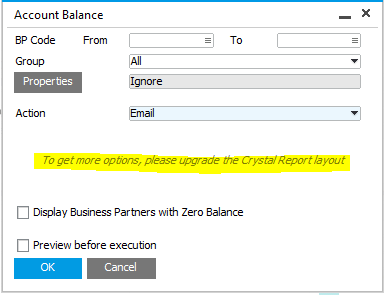
Unfortunately, the Layout for HANA does not support the advanced parameters as we have not been able to make them work due to the limitation in the SQL Query language for HANA.
The Layout only supports the basic parameters.
If the message confuses the users you can hide it with the Item Placement Tool.
Comments
7 comments
Hi there,
Any idea when this limitation would be improved upon?
Kind Regards,
Nick Lakasas
Hello Nick,
Unfortunatelly SAP is responsable and we still don't have a date.
Hi Yaremi,
I see this message even for a non-HANA version??
SAP 9.1 PL11 SQL version
Thanks,
Ajay
Hi,
This message will also popup if you upgrade your b1up installation but still have the old account balance report set up. Please update the account balance report template from the B1UP installation package to the network drive where you have the old account balance template placed.
After this, go to your crystal report definitions and update the parameters:
This should fix the problem.
-Thomas
Hi Thomas,
This did not help to remove the error message even after refreshing the parameters, restarting the add-on.
Your suggestion did not fix the problem.
-Ajay
Please sign in to leave a comment.