During the add-on startup, you can see the following message:
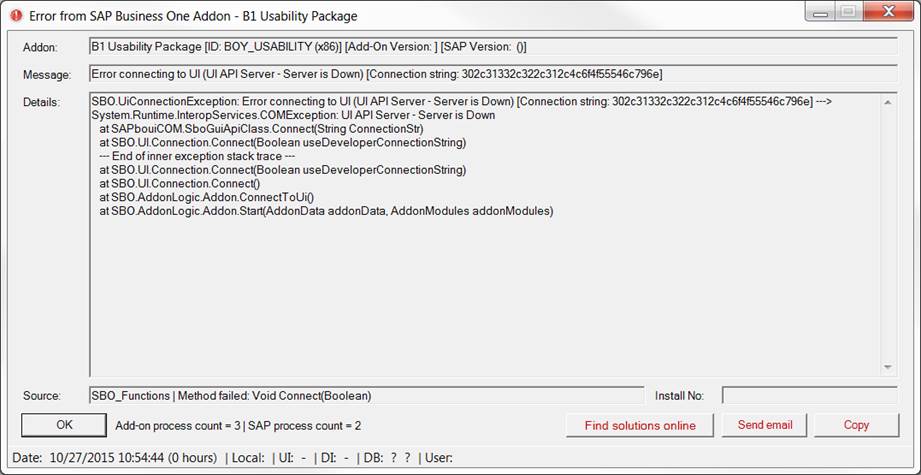
This error is an SAP Bug (Note: https://launchpad.support.sap.com/#/notes/2875011)
Workaround (from SAP):
End all SAP Business One Client-related processes (SAP Business One.exe and SAPbouiCOM.exe) and restart SAP Business One Client.
If the workaround doesn't fix the issue and it's persistent, please contact SAP support as this is an issue with the SAP environment.
There are a few things we know that can help:
1. Run the client in "Run as administrator" mode. If this helps, then there's something wrong with the permissions on the system as the UI-API cannot run while starting the B1 Client without administrative permissions.
2. The SAP B1 Client components are not registered correctly, or the installation has been corrupted. In that case, please follow our reinstallation guide to install the SAP B1 client properly.
Comments
7 comments
Hi Lee What I have done is I deleted the SM_OBS_DLL located on the temp folder and then run SAP B1 to recreate that folder for it to apply the proper security permission. This seemed to have worked for me. Regards JP
It also seem that finding all "SAP Business One.exe" on the machine (across all users) and killing them with Task Manager resolves the issue in some cases instead of restarting the entire server
Just checking in to see if there are any updates on this issue?
Regards,
Mike
I too am having a problem with this error while performing a reinstallation. Only one user affected so far.
Have not restarted server yet. Will also try Jun method
Please sign in to leave a comment.