Boyum Help Center Help Center home page
Boyum IT Solutions Community Submit a request
Sign in
  1. Boyum Help Center
  2. Beas Manufacturing
  3. Tutorials and Knowledge Base
  4. Material Management

SAP stock transaction disabled because of Beas

  • Updated April 01, 2022 12:46

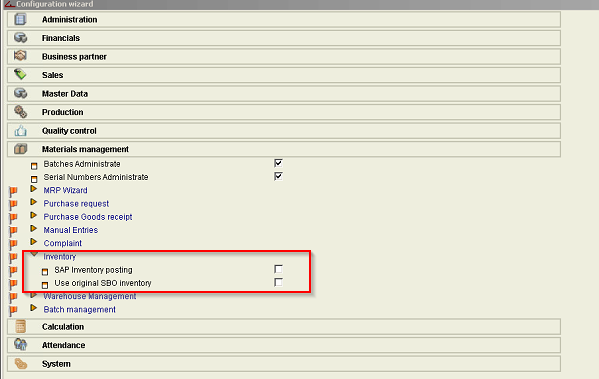
IF  you are not able to do a SAP stock transaction  when Beas started

Then please do the following

  • Beas using own stock transaction.
  • So if you need SAP stock transaction then you need to active in:

    Beas - configuration wizard - materials managment - inventory
    inventory.png

Was this article helpful?

0 out of 0 found this helpful

Related articles

  • Beas: error message "Merchandise dispatch cannot be created : (-5002)"
  • Beas: Different inventory information in warehouse with bins
  • How to change the status of the Picklist to Ready by scripting
  • Produmex Scan: Redirected printer cannot be used
  • Printing with Crystal Reports in beas with SAP Business One 10.0 FP 2111

Comments

0 comments

Please sign in to leave a comment.

Articles in this section

  • Batch Split Warning
  • Layout setting for Batch and SERIAL Number for goods receipt PO
  • Beas BoM or routing 'Not released' error message
  • Beas Open sales order to production order - SQL error
  • SAP stock transaction disabled because of Beas
  • Beas: error message "Merchandise dispatch cannot be created : (-5002)"
  • Beas: How to transfer the warehouse which is mentioned in the sales order to the workorder which is linked to the sales order
  • Beas with negative stock
Boyum IT Solutions
Español (Latinoamérica)
Zendesk Theme by Zenplates