Boyum Help Center Help Center home page
Boyum IT Solutions Community Submit a request
Sign in
  1. Boyum Help Center
  2. Beas Manufacturing
  3. Tutorials and Knowledge Base
  4. Crystal reports / Printing issues

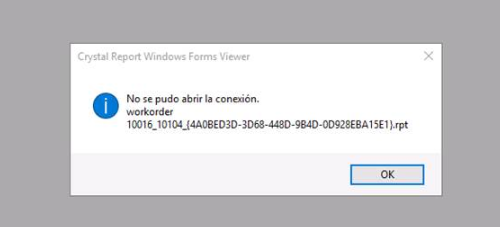
Problem print report in HANA - login to report error

  • Created December 10, 2019 10:21

Problem

  • When you try to print report in HANA

mceclip1.png

can be two reasons:

  1. Connection string in the report isn't okay 
    • in  this case please see attachment

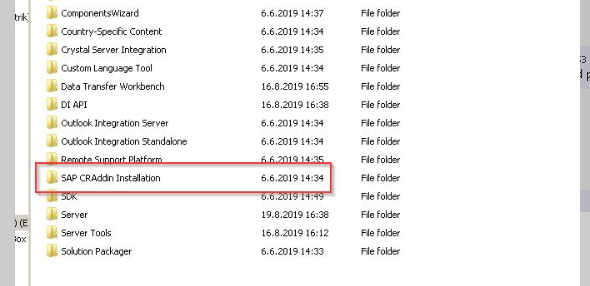
  2. Problem is missing CRAddin installed
    • please install package from SAP installation folder
      mceclip0.png
  • NewCrystalEngine.docx500 KB

Was this article helpful?

0 out of 0 found this helpful

Related articles

  • Crystal Report Errors
  • Printing with Crystal Reports in beas with SAP Business One 10.0 FP 2111
  • Beas: Setup Macro with print and save a Crystal Report
  • B1UP Issue - Parameters setup screen in Dashboards module
  • Crystal report windows forms viewer: "logon failed. Please try again"

Comments

0 comments

Please sign in to leave a comment.

Articles in this section

  • Printing Reports to PDF with "Microsoft Print to PDF"
  • Printing with Crystal Reports in beas with SAP Business One 10.0 FP 2111
  • Crystal report windows forms viewer: "logon failed. Please try again"
  • Problem print report in HANA - login to report error
  • Beas: Setup Macro with print and save a Crystal Report
  • Beas: Only numbers are displayed for the barcode in Crystal Report
  • Beas: existing database views, especially for Reports/reporting
  • Beas: print multiple copies from Beas print layout (Crystal Report)
  • Beas: Working with QR-Codes in Crystal Reports
  • Beas: How to assign new report for printing to work orders

See all 11 articles

Boyum IT Solutions
Español (Latinoamérica)
Zendesk Theme by Zenplates