Boyum Help Center Help Center home page
Boyum IT Solutions Community Submit a request
Sign in
  1. Boyum Help Center
  2. CRM for Outlook
  3. Server Installation

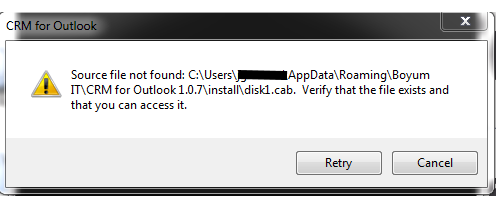
Error: disk1.cab

  • Updated February 16, 2015 10:22

This error typically happens if your antivirus manipulates the install file during download. The solution is to download the file onto another machine and the transfer it to the server via USB or shared drive.
 

Was this article helpful?

0 out of 0 found this helpful

Related articles

  • CRM for Outlook – FAQ
  • Guide - manual

Comments

0 comments

Please sign in to leave a comment.

Articles in this section

  • CRM for Outlook - Set up the server to run using a dedicated user
  • CRM for Outlook - Error -132: Connection to license server is not authenticated
  • CRM for Outlook - Error -129: Connection with license server failed
  • CRM for Outlook - Error: -119: Database server type not supported
  • Can I use the 64 bit Add-on together with the 32 bit Server-component and why is there no 64 bit server-component
  • Enabling direct LAN connections to the CRM for Outlook server
  • CRM for Outlook - "Server not online" error messages
  • Error: disk1.cab
  • CRM for Outlook – Install Guide (Server)
  • CRM for Outlook – FAQ (Server)
Boyum IT Solutions
Español (Latinoamérica)
Zendesk Theme by Zenplates