Boyum Help Center Help Center home page
Boyum IT Solutions Community Submit a request
Sign in
  1. Boyum Help Center
  2. Beas Manufacturing
  3. Tutorials and Knowledge Base
  4. MRP

Required settings to see items in MRP

  • Updated July 27, 2020 13:57
  • 1 comment

There are 4 main settings required to make items appear in the MRP run

1. Set planning method to MRP in item master data


2. Define a primary warehouse
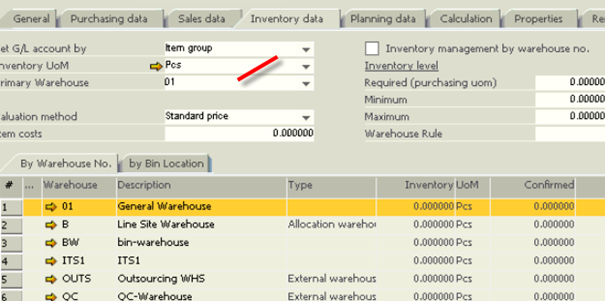
 

3. Inlcude the warehouse in the MRP Scenario


4. Check for filters in scenario and order recommendation report


See also Help on MRP


Was this article helpful?

3 out of 3 found this helpful

Related articles

  • Setting Up an MRP Scenario
  • How to set MRP didn't breakdown the subassembly
  • MRP planned activity is not triggered
  • Precalculation and MRP performace in Beas
  • Beas mrp: Insert tabs "Purchase", "Produce"

Comments

1 comment

Date Votes
  • Comment author
    Alejandro
    • January 14, 2018 22:21

    good article. Thank you

    0

Please sign in to leave a comment.

Articles in this section

  • Beas Manufacturing 2025.09.01 HF (September 2025)
  • Beas: How to add OITM UDF in order recommendation screen
  • MRP shows requirement for non-MRP assembly item
  • MRP planned activity is not triggered
  • Warehouse rules in MRP
  • Changing the quantity on an order related subassembly has no effect on MRP
  • Mrp calculation on HANA enviroment retrieves SQL errors
  • Setting Up an MRP Scenario
  • Beas: How to display an UDF in the inflow-outflow tab of the order recommendation
  • How to set MRP didn't breakdown the subassembly

See all 12 articles

Boyum IT Solutions
Español (Latinoamérica)
Zendesk Theme by Zenplates