Boyum Help Center Help Center home page
Boyum IT Solutions Community Submit a request
Sign in
  1. Boyum Help Center
  2. Beas Manufacturing
  3. Tutorials and Knowledge Base
  4. Terminal

Beas: Terminal - change logout time

  • Updated July 15, 2020 11:24

Topic

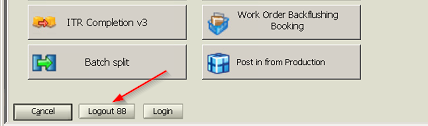
  • automatic logout time in terminal is very short or too long

logout1.png

Solution

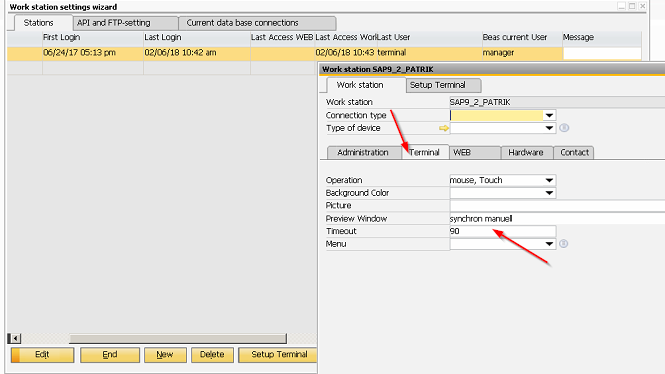
  • Go to Beas - administration (extra) - system initialization - work station setting wizard
  • Tab terminal - field timeout

logout.png

Was this article helpful?

3 out of 3 found this helpful

Related articles

  • Beas performance issues, troubleshooting
  • Add-on connection timed out (when trying to start add-on)
  • How to install web app 2.1
  • How to record the debug log for the beas web apps
  • You get error "The Server threw an exception" while doing the DI-API Connection

Comments

0 comments

Please sign in to leave a comment.
Articles in this section

  • Disable old beas terminal
  • Beas Terminal - on-screen keyboard settings
  • Beas Manufacturing Terminal licenses - Licenses check control update as of 1st of January 2021
  • Reporting a Time Receipt on the Terminal
  • Beas terminal crash during material issue
  • Beas apps not visible
  • Beas: Open the terminal is very slow
  • Beas: Terminal - change logout time
  • How to create Program Group and assign to an user in Beas
Boyum IT Solutions
Español (Latinoamérica)
Zendesk Theme by Zenplates