Boyum Help Center Help Center home page
Boyum IT Solutions Community Submit a request
Sign in
  1. Boyum Help Center
  2. B1 Usability Package
  3. Samples

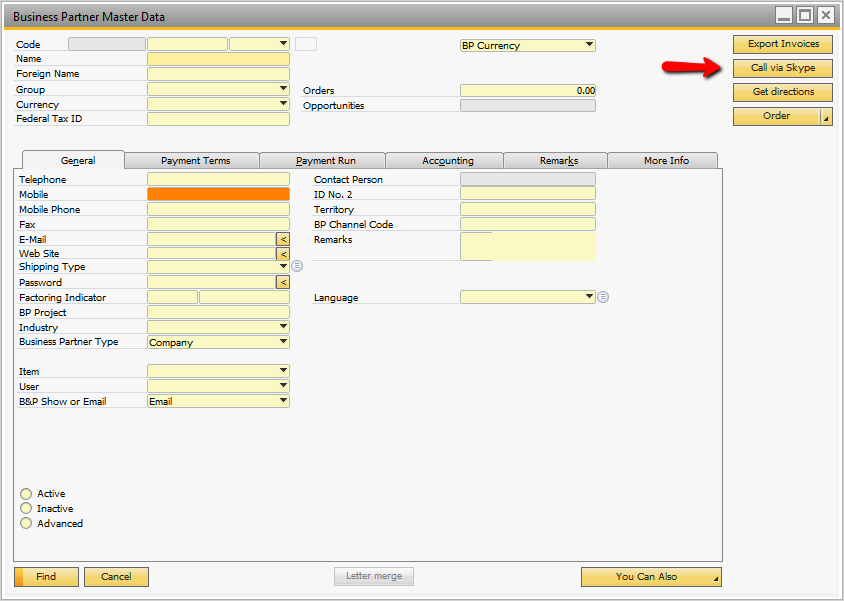
[Function Buttons] Call a business partner using Skype

  • Updated November 26, 2021 12:32

The customer uses Skype (TM) to communicate with its customers and wishes easy access to do so from SAP Business One.

  • Call a Business Partner using Skype Sample Package.bcp2 KB
  • Call a Business Partner using Skype.pdf500 KB
  • 08 - Llamar a un socio de negocios usando Skype.pdf400 KB

Was this article helpful?

0 out of 0 found this helpful

Related articles

  • [Line Loop & Macro] Automate "copy to" and remove specific line you don't want included
  • Universal Function - How to chain Universal Functions
  • [FULL SETUP] Display picture in List of items window
  • [Function Buttons] Google Maps and Google Driving Directions
  • SAP Limitation - Not possible to colorize cells in an SQL report

Comments

0 comments

Please sign in to leave a comment.
Articles in this section

  • [FULL SETUP] Advanced budget module for B1 Usability Package
  • [FULL SETUP] Repair Production Orders Sample (From Partner Mascidon, LLC)
  • [B1 Validation & UF] How can I block a menu item, or an item on the right-click menu?
  • [FULL SETUP] Display picture in List of items window
  • [LineLoop / Macro] Auto-select batch numbers by expiry date
  • [Crystal Reports] Template files
  • [UFFI] Import data examples
  • [UFFE] Export Sales Order as XML file
  • [Line Loop] Duplicate first line combobox choice for all document lines
  • [Line Loop & Macro] Automatic outgoing payment

See all 45 articles

Boyum IT Solutions
Español (Latinoamérica)
Zendesk Theme by Zenplates