What can i do, if i have a problem with Beas WEB APP or Beas common service
Question: Can't connect to Beas web service
Answer:
Check, if your tomcat/Apache Server is running
Apache Server: Check the correct Port IP and number
You can see this in Beas manager server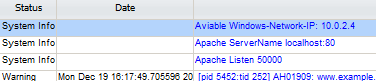
Question: View not correct, results not correct, no affect on my database
Answer 1:
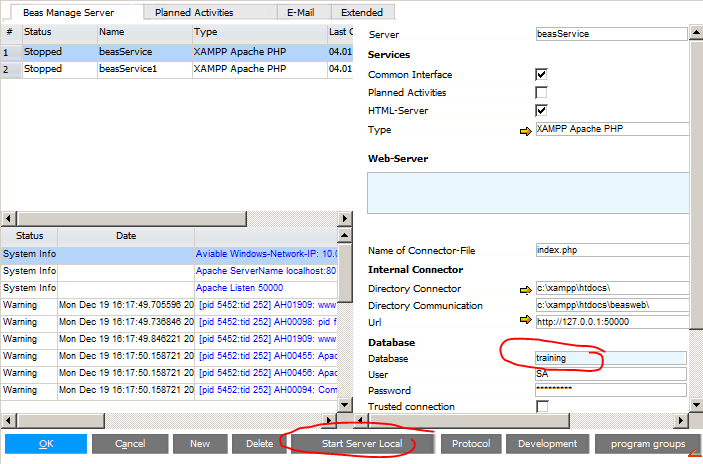
Please check, if you work with the correct database
If you have more services: check this for all service
You must restart the service after changing
Answer 2:
Stop all services and start this with "Start Server Local"
Activate all, what you need
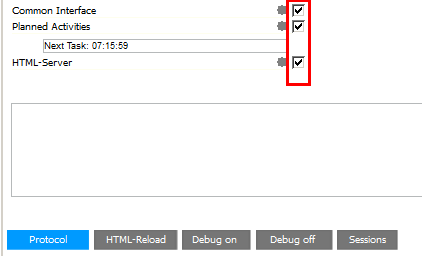
Check again. If now working, any setting in the services are wrong
Question: I can't print
Answer: In Service mode you can use only network printer, not local printer. If you need local printer, start the Service with a local user connection (Window - Services - open the Beas service entry - change account)
For test this: You can start the service as "local version" (Beas Manager Server" - "Start Server Local"
Question: Common Service don't execute all lines
Answer: Stop the services, Test this with "Beas Manager Server" - "Start Server Local" - open debug window - Level 2 and test again. Check the debug protocol.
Question: i need a debug log from Beas web services
Answer:
Open manage server
Stop all services
Click on Button "Start server local"
Open Debug window - Level 2
Try again. Now you see all activies in the debug log
Question: Beas web service goes offline after performing some actions.
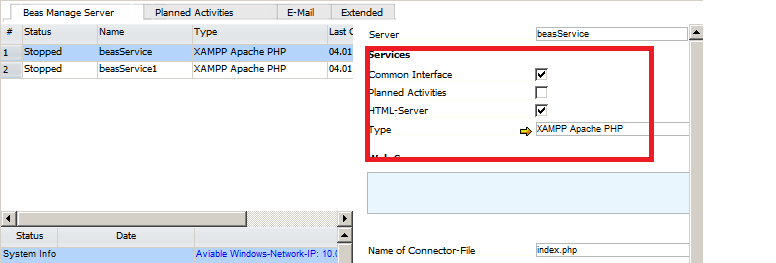
Answer: Check, if single service is used for common interface and html server.
If yes, create a second service for common interface.
Comments
1 comment
New in this article WEB APP: How to create a debug log
Please sign in to leave a comment.