
2021.10 Release
Please see the official release notes documentation and download links here.
Summary
Our Q3 release keeps improving the quality of Produmex Scan, and we urge our partners and customers to upgrade to this version as soon as possible.
Note: If you use Produmex Manufacturing and you upgrade to Produmex Scan 2021.10, make sure that you upgrade to Produmex Manufacturing 2021.10 as well. Without upgrade Produmex Manufacturing will not work because of version incompatibility.
Usability Improvement Program
The Usability Improvement Program (UIP) have been created to give all Boyum IT customers the ability to contribute to the design and development of Boyum IT products. The system sends data to Boyum IT, more precisely, it sends feedback (generic and add-on specific information) and error while the end results are software improvements to meet the needs of our customers.
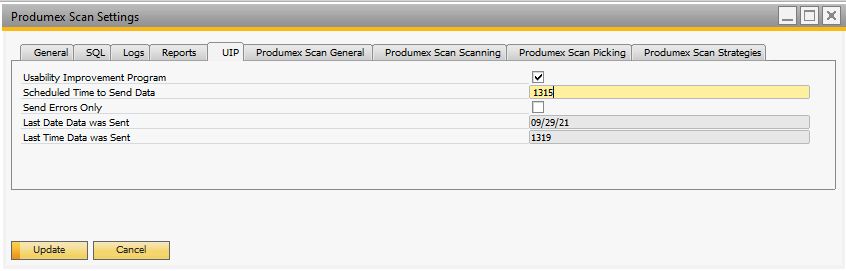
With product version 2021.10, Produmex Scan adds a new UIP tab to the Produmex Scan settings window with the following settings:
-
Usability Improvement Program setting to enable the feature
-
Scheduled Time to Send Data setting
-
Send Errors Only setting
-
Last Date Data was Sent
-
Last Time Data was Sent
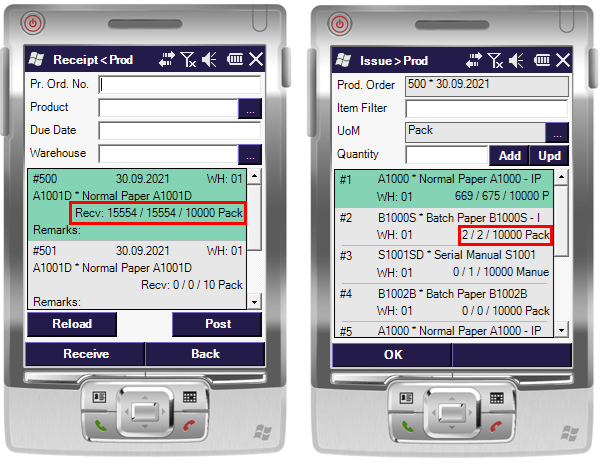
E.g. 6/9/10 pack means that altogether 10 packs should be received, out of which 9 packs have already been received and 6 packs have been received by the given employee. It means that 3 other packs have been received by (an)other employee(s). These transactions now can be posted separately.
E.g. 6/9/10 pack means that altogether 10 packs should be issued, out of which 9 packs have already been issued and 6 packs have been issued by the given employee. It means that 3 other packs have been issued by (an)other employee(s). These transactions now can be posted separately.
- Goods Receipt PO Flow, Goods Receipt PO window
- Free Goods Receipt PO Flow, Goods Receipt PO window
- Sales Return Flow, Delivery window, Return window
For more information check out the demo video and consult with the documentation below.
Produmex Scan for Android: cursor focusing
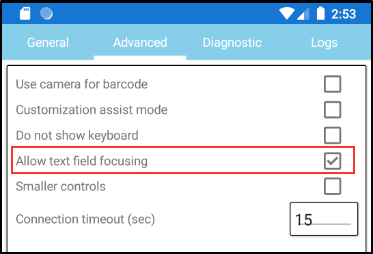
Produmex Scan now offers the new Allow test field focusing advanced setting. With the cursor focusing customization option, you can define the text field on which the cursor is focused and the keyboard is also automatically displayed so that you can immediately start writing.
Comments
0 comments
Please sign in to leave a comment.