You can have a "No database access" icon in the CRM for Outlook client ribbon:
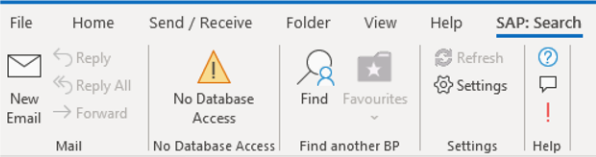
There can be two reasons for this:
1. On the server component, there are no databases linked to the service. Please go to the CRM for Outlook server component and re-run the wizard to ensure the databases are connected. Finish the wizard to make sure that any changes made are saved.
2. On the portal database, access is controlled via the user groups. Please look at your user group linked to your user and make sure it's either marked to be able to access all databases or have at least one database selected.
Please check this video in order to fix the authorizations: https://www.youtube.com/watch?v=lA0coJyeGBU
Comments
0 comments
Please sign in to leave a comment.