Boyum Help Center Help Center home page
Boyum IT Solutions Community Submit a request
Sign in
  1. Boyum Help Center
  2. Beas Manufacturing
  3. Tutorials and Knowledge Base
  4. System / Performance

Register Beas - Class name not found

  • Updated April 21, 2022 12:16
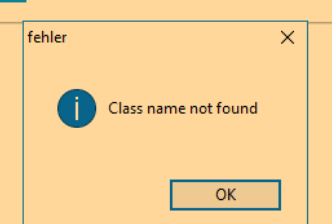
  • during register beas addon in SAP 64bit you'll get this message
    mceclip0.png

Solution

  • we don't know what cause this problem, my opinion is that is an SAP issue but it wasn't reported to them as solution was found
  • Reinstall SAP client and then it will work properly

Was this article helpful?

2 out of 2 found this helpful

Related articles

  • Troubleshooting B1UP crash or disconnects
  • SAP Issue - I get error "Continue working without this Add-on" when trying to update Add-on information
  • Beas: "version.ini" not found
  • Beas error during start - of_recht Line 47
  • Beas installation error in Chilkat component

Comments

0 comments

Please sign in to leave a comment.

Articles in this section

  • Beas Manufacturing in a Cloud environment
  • Improvements of the Beas Manufacturing activity log
  • Beas missing icons
  • How to install beas in SAP web client
  • Unable to register DLL/OCX during beas installation
  • Beas fields created without description
  • Beas: Missing buttons
  • Beas error retrieving company list
  • BEAS DEBUGGER: Work outside of SAP Business One
  • HTTPS configuration for Beas

See all 40 articles

Boyum IT Solutions
Español (Latinoamérica)
Zendesk Theme by Zenplates