You can work with the Debug window in Beas Standalone mode and also when Beas entries are collected within a separate menu point in the Modules tab of the SAP Business One Main menu.
In this way, you can get an HTML view of the debug log with images and get a clear understanding of the process.
Launch the debugger: "View" tab > System information or Ctrl + Shift + I (alternatively Ctrl + N + D)
To access debug information of a window, proceed as follows:
1. Click on the Print Screen button in the Protocol tab.
2. Mark a line and Shift + double-click on certain information you wish to edit.
3. A red rectangle appears (see image below) which can be moved and resized with the mouse.
4. Click the "Clapperboard" / "Eye" button to access the HTML view.
The different colors help support agents to quickly analyze every click and setting performed in a chronological order in the log.
In case you need support, you can simply copy the URL address of the Debug log to the clipboard and paste it in the Boyum help page to submit a request.
First, paste the URL string of the Debug log and describe the issue in a simple way. Then, fill all mandatory fields and send your request to support:
To get a short overview of all functions, tabs, buttons and fields of the Debug window, watch this video.
Related to
Comments
4 comments
Hi Gabor!
In touch-based kiosk scenarios (e.g. Zebra KC50 running Beas Manufacturing Terminal), the Beas UI debugger (red rectangle) can be triggered unintentionally by multiple fast taps on the screen, effectively blocking the production terminal.
Is there any supported or planned way (configuration, parameter, registry, or environment flag) to disable or limit the debugger trigger for touch / kiosk environments, or to restrict it only to explicit keyboard input (SHIFT + double-click)?
Dear Tomasz,
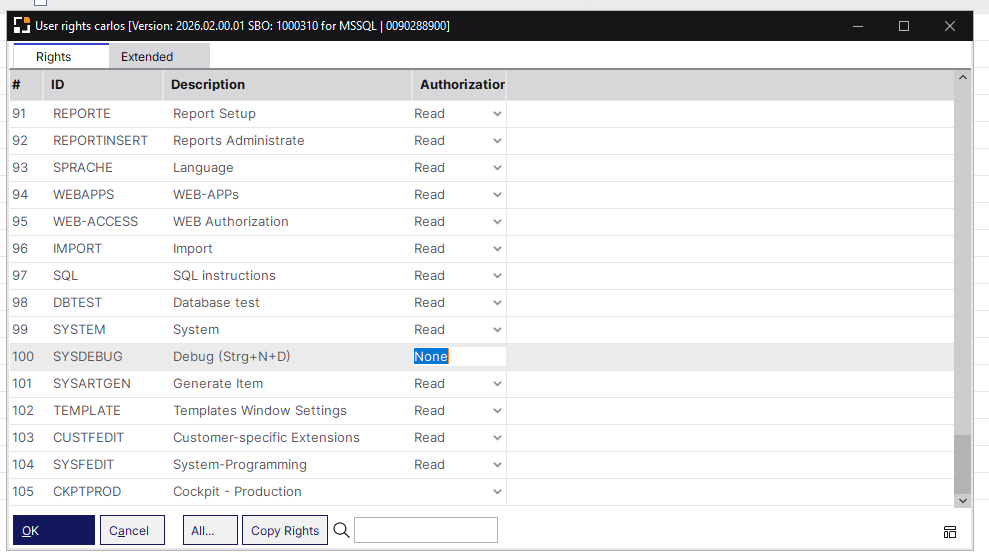
As of now, one way to prevent opening the debug screen is to remove the permission to open the screen for that user:
Hi Gabor,
We verified the suggestion regarding permissions.
Setting SYSDEBUG = None correctly removes access to the debugger functionality itself, however it does not disable the debugger trigger mechanism. The SHIFT + double-click gesture is still active and still switches the UI into debugger mode (red rectangle), even though the user cannot effectively use the debugger afterwards.
For our use case (touch-based production kiosks), the trigger itself is the main issue, as it blocks the terminal during normal operation.
Is there any supported way to fully disable the debugger activation trigger (SHIFT + double-click / multi-tap), or to restrict it strictly to classic desktop environments? If not, is this behavior planned to be addressed for kiosk / touch scenarios?
Hi Tomasz, now this is a different type of question. Please submit your request to support in our HelpCenter and we'll be back to you shortly! Thank you.
Please sign in to leave a comment.