With Data Integration Hub, Beas allows to import data from external application or softwares in an automatic way.
We just need a file with the information we would like to import and Beas, the rest will flow smoothly.
How is the procedure?
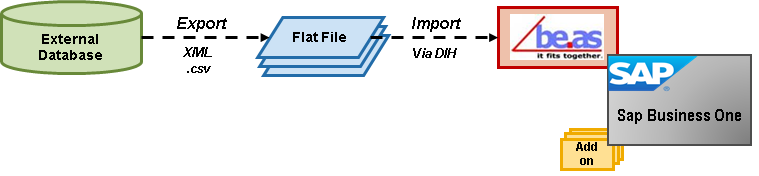
Data Integration Hub has these special features:
-
Very simple to use
-
XML files integration in a fast way
-
Same file to transfer several master data
-
Events can be scheduled
-
The system allows preview from the document and integration structure
- Multiple activities of integration: insert and/or update
Integration Data supported by Beas
Here is a list of all specific data that can be integrated with the Data Integration Hub functionality:
Attendance:
- Attendance
- Personnel
Business Partner:
-
Business Partner
-
Contact information of employees
-
Ship To and Bill To addresses list
Item:
-
Item
-
Item version administration
-
Item version administration status
-
QC Cross reference
-
Documents Item version
-
Item parameter
-
Documents Item OP catalog etc
-
Bill of Materials Header
-
Bill of Materials Positions
-
Bill of Material alternative items
-
Routing Header
-
Routing Positions
-
Routing Tool
Resources and Tools:
-
Resources
-
Operation Templates
-
Operation Templates resources
-
Tool Administration
-
Tool Bill of material
Quality Control:
-
QC Plan Header
-
QC Plan Measurement positions
-
QC Order Columns
-
QC Samples
-
QC Samples Definition
Bin Warehouse:
-
Bin Location Warehouse area
-
Bin Location: bin definition
Material Management:
- Transaction plan lines
Production (Factory Data Collection):
- Production Time Receipt
More information see
 Webinar Concept and using Integration Hub 2016/12
German Video Webinar Integration Hub
Comments
0 comments
Please sign in to leave a comment.