Boyum Help Center Help Center home page
Boyum IT Solutions Community Submit a request
Sign in
  1. Boyum Help Center
  2. B1 Usability Package
  3. UF: File Exporter and Importer

How to use C# in Line Sources

  • Updated August 08, 2022 08:24

Here is a small sample of how it works (click the link below for a full resolution image, and attached are UF for sample import).
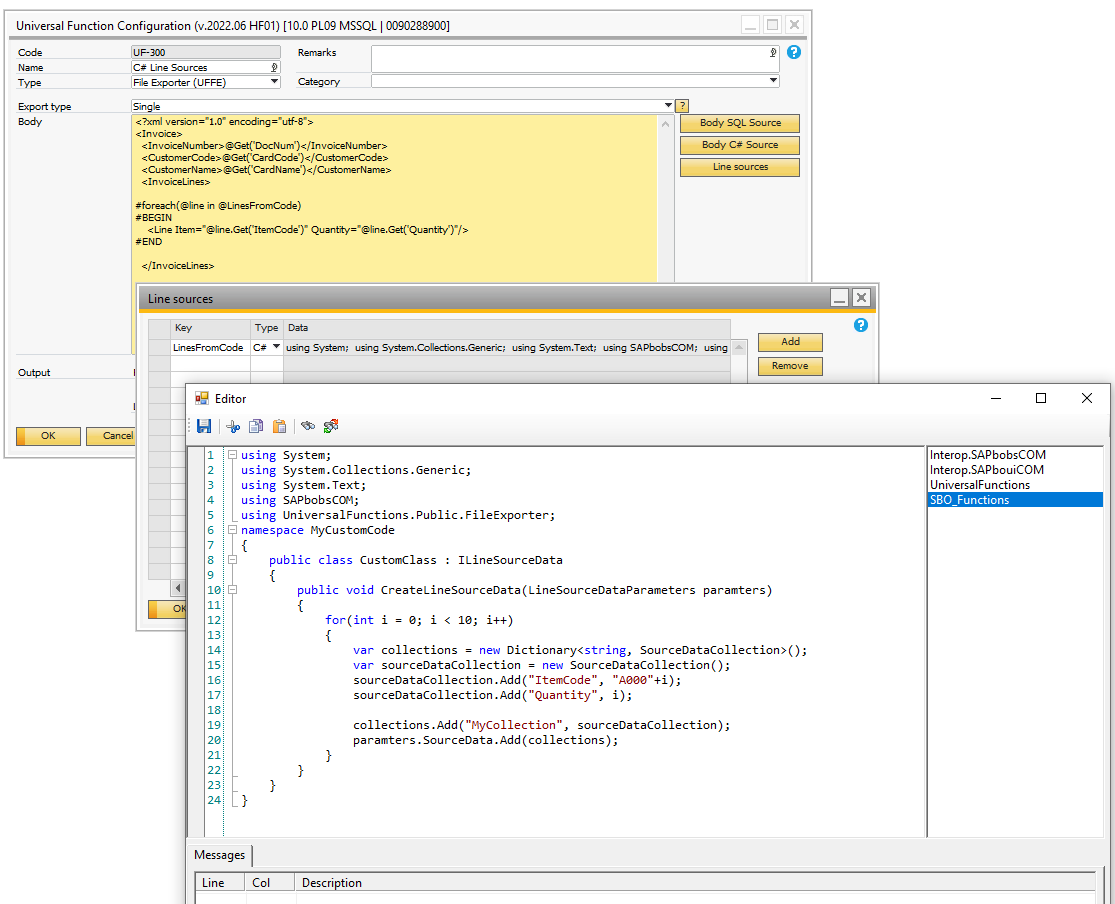
mceclip0.png


  • UF-300 - C# Line Sources (File Exporter).xml6 KB

Was this article helpful?

0 out of 0 found this helpful

Related articles

  • [UFFI] Import data examples
  • UFFI - Import Purchase Invoice
  • Guide - How to debug Dynamic code (and UFFI)
  • How to use new features in SDK despite B1UP being built on an older SAP Version
  • FAQ - General

Comments

0 comments

Please sign in to leave a comment.

Articles in this section

  • How to use C# in Line Sources
  • How to mark an Invoice as exported from UF – File Exporter – Without using Update query statement
  • UFFI - Import to documents UDO
  • File Exporter - The basics
  • UFFI - Import Purchase Invoice
Boyum IT Solutions
Español (Latinoamérica)
Zendesk Theme by Zenplates