This is an advanced configuration, and support is considered a premium service.
It is possible to trigger a UF schedule using the windows task scheduler. It requires sending in some parameters to the exe:
/ServiceNameScheduler:"TEST export" /ServiceName:"TEST export" /ComponentName:"B1PD" /ErrorEmail:"xx@boyum-it.com" /SucessEmail:"" /UseErrorEmail:"True" /UseSucessEmail:"False" /EmailServer:"boyum-mail1" /EmailDomain:"" /EmailUserName:"" /EmailPassword:"" /EmailFrom:"xx@boyum-it.com" /EmailPort:"0" /EmailUseSsl:"False" /ConfigurationId:"c87db5f7-c66e-49a8-80a6-03a1ffe12eeb" /StartTime:"2017-09-25 07_31_05" /UseProxy:"False" /ProxyAddress:"" /ProxyPort:"0" /Server:"MLP-PC" /Username:"manager" /Password:"xx" /DatabaseName:"SBODemo_US" /Language:"3" /ServerType:"8" /DbUsername:"sa" /DbPassword:"xx" /TrustedSecurity:"N" /LoggingFolder:"C:\Program Files (x86)\Boyum IT\B1UP Server component\Eventlog" /ServerComponentVersion:"2021.0.9.0" /AddonVersion:"2021.1.0.0"
It is possible to not use at all the parameters that have empty values, or not specify the ServerComponent and Addon version if you have only one installed.
Where you will need to replace the parameters with your own values. The ConfigurationId parameter is the id of the schedule in the database:
The server types are:
public enum BoDataServerTypes
{
dst_MSSQL = 1,
dst_DB_2 = 2,
dst_SYBASE = 3,
dst_MSSQL2005 = 4,
dst_MAXDB = 5,
dst_MSSQL2008 = 6,
dst_MSSQL2012 = 7,
dst_MSSQL2014 = 8,
dst_HANADB = 9,
dst_MSSQL2016 = 10,
dst_MSSQL2017 = 11,
dst_MSSQL2019 = 15
}
Tip:
If you wish to have the arguments generated for you can execute the component exe with out paramters (Example the B1PrintComponent.exe) and log in
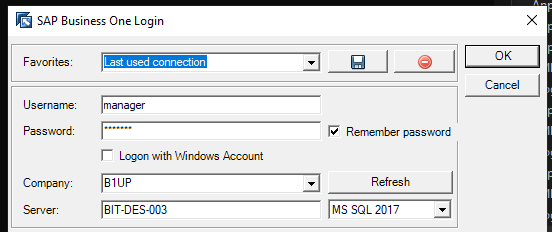
Then choose your schedule configuration and various other options
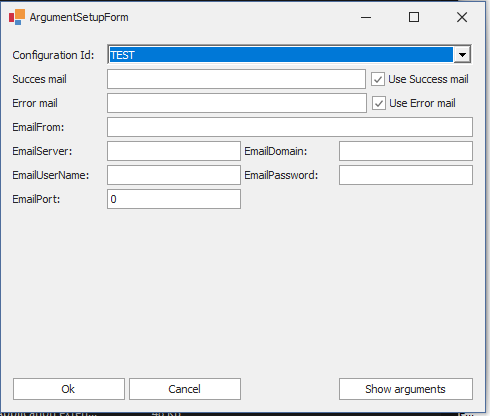
Finally press the "Show arguments" button (Press CTRL + C to copy/paste)
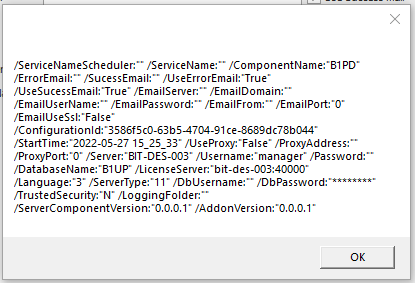
(only thing you need to provide yourself is the password as this will not show them to you in clear text)
Comments
0 comments
Please sign in to leave a comment.