Boyum Help Center Help Center home page
Boyum IT Solutions Community Submit a request
Sign in
  1. Boyum Help Center
  2. B1 Usability Package
  3. UF: Macro

SAP HANA - Setting a date value using UF - Macro

  • Created October 13, 2017 05:45

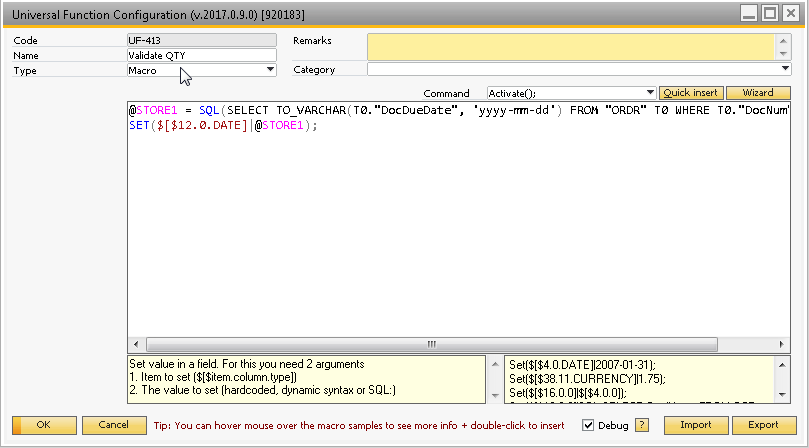
When trying to set a date value using the Macro system you need to make sure that you have the correct date format.

The following SQL will return a date format that can be used to set a field:

SELECT TO_VARCHAR(T0."DocDueDate", 'yyyy-mm-dd') FROM "ORDR" T0 WHERE T0."DocNum" = 972

The format needs to be 'yyyy-mm-dd' for it to work.

Example:
Was this article helpful?

0 out of 0 found this helpful

Related articles

  • How to work with Date format in SQL: Set command
  • SAP Object Types
  • SAP HANA - How to use DECLARE in a SQL report
  • [.NET Snippet] Getting the mode of a form in a macro
  • [Line Loop & Macro] Automate "copy to" and remove specific line you don't want included

Comments

0 comments

Please sign in to leave a comment.

Articles in this section

  • How to select a specific value from the new "Add/Update/Ok" multi buttons in SAP 10?
  • How to work with decimal format in SQL: Set command if comma is used as decimal separator
  • How can I call a SAP Generated UDO when Menu Uid keep changing?
  • SAP HANA - Setting a date value using UF - Macro
  • SAP HANA - display value formatted like a currency with commas and 2 decimals in a B1UP label
  • Info on Macro and dividing numbers in @STORE
  • FAQ - Macro
  • Macro commands vs UDF Sidebar
  • How to use SetValidValues() and ClearValidValues() commands
  • How to work with Date format in SQL: Set command
Boyum IT Solutions
Español (Latinoamérica)
Zendesk Theme by Zenplates