JPI - Custom Filters > Dynamic Dates (2 WEEKS etc)

Regarding Just-Plan-It
Settings > Custom Filters > Date field filters
I'm writing to request a specific improvement to the JPI Custom Filters feature when using a date as a filter. JPI currently lacks the ability to create dynamic views because the date filters require hard dates. This forces us to manually adjust settings every time we want to view a standard window, like a 2-week lookahead. or "This Month" or "Next Month".
Consider how I'd want to see from a financial aspect which jobs are vulnerable to not getting out "THIS MONTH". I don't want to export data and analyze it on a sheet. It would be much faster to use a custom filter and drop down with my date selection.
Could you implement a dynamic date range dropdown similar to what I'm used to using across other cloud apps?
Specifically, we need a "Range" field that offers:
-
Variable Input: The ability to select "Next [ N ] Days" and input a number (e.g., 14 days)
-
Rolling Presets: Options like "This Week," "Next Week," or "Next 120 Days."
This feature would be help us maintain efficient, automated views of our production schedule without the administrative waste.
Thanks
Comentarios
3 comentarios
Any feedback on this, please?
Have you considered is using custom fields "Month" and/or "Week" and populating the job with "April" or "Week 14" to be used in a Job Custom Views of Custom Filters?
It is very easy to update these fields using the latest release for Batch Updates.
https://support.boyum-it.com/hc/en-us/articles/34364609639197-Batch-update-jobs-tasks-resources
dave.luckner I appreciate your engagement here but people do not have that kind of time to rely on updating custom filters for this. And trust me, I tried.. I used CustomFilters to mimic "Due in [Month]", so Due in April would be like DueDate < 5/1/2026 & DueDate > 3/30/2026.
And another for "DueDate < March 22, 2026" for "Due within 2 weeks".
This way I wasn't burning a CustomField, since we only get 10.
It was a chore to keep this up and you become vulnerable to human error. It is not acceptable vulnerability when we seek to make JPI our central nervous system for interdepartmental views of our capacity load and jobs/tasks on a rolling weekly / bi-weekly / monthly basis
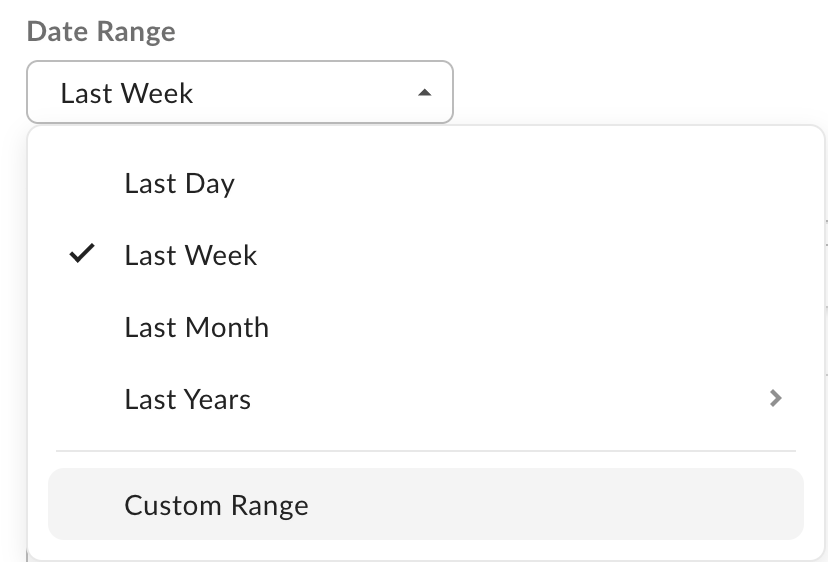
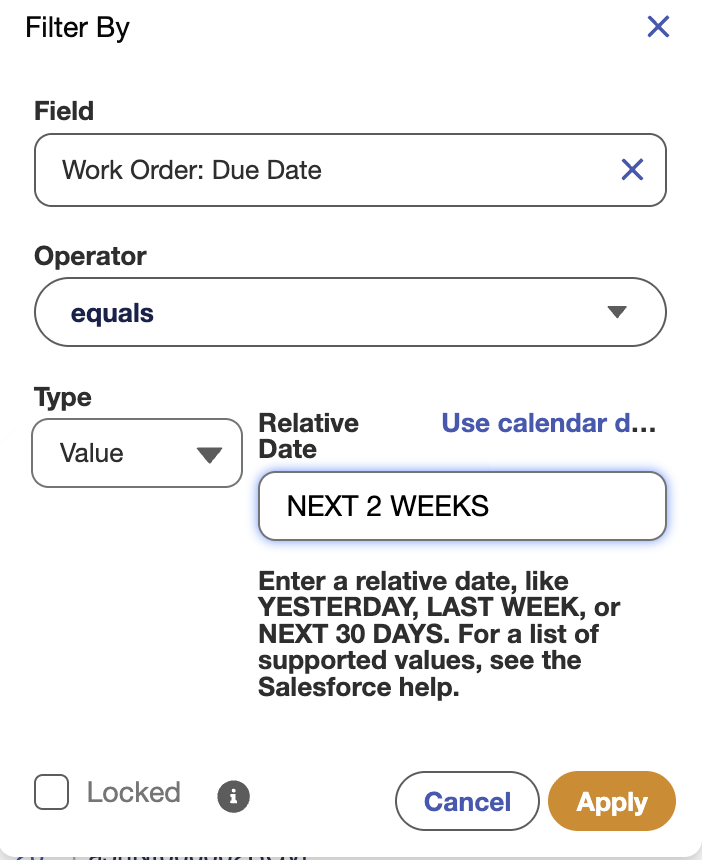
All my other database SaaS companies have this feature standard.
It is especially missed in the Reports tab.
But in other systems, it's expected to see:
Or like this:
Here is documentation about this feature:
Relative Date Filter Reference
Relative date filters let you filter on date fields using easy-to-understand, human-speech-inspired syntax.
For example, instead of filtering on
Close Date greater than Jan 1, 2017, filter using a relative date:Close Date equals this year.For Enterprise, Unlimited, Performance, Professional, and Developer Editions, the week is defined by the Locale dropdown list on your personal information page. For Contact Manager, Group, and Personal Editions, the week is defined by the Locale setting in the company profile. For example, when the locale is US English, a week runs Sunday to Saturday, whereas with UK English, a week spans Monday to Sunday.
Capitalization doesn't matter in relative date filter operators. THIS YEAR works, as do This Year and this year.
For example, say that your opportunity report's standard date filter is CLOSE DATE equals NEXT 5 DAYS and you run it on October 24. The report returns opportunities that close sometime between October 24 through October 28.
Say that your opportunity report has a custom field filter (instead of a standard date filter) for CLOSE DATE equals NEXT 5 DAYS and you run it on October 24. The report returns opportunities that close sometime between October 25 through October 29.
For standard date filters, starts at 12:00:00 AM on the day that the report is run and continues for n days. (The range includes today.) In standard filters, n can be 7, 30, 60, 90, or 120.
For custom field filters, starts at 12:00:00 AM on the next day and continues for the next n days. (The range does not include today.)
Starts at 12:00:00 AM on the first day of the fiscal quarter before the current fiscal quarter and continues through the last day of that fiscal quarter. The fiscal quarter is defined on the Fiscal Year page in Setup.
None of the FISCAL literal date values are supported when creating mobile custom views.
Iniciar sesión para dejar un comentario.