Disable / hide new user feedback menu options

Summary:
Add option to disable / hide the new user feedback menu options
Background:
With the 2024.12 release menu options were added giving users direct access to documentation, help center articles, etc. This includes:
-
Feeback Survey
-
Product News
-
Product roadmap
-
Knowledge articles in our community
-
Updates from the latest release
These menu options were added to both the SAP client and to the WMS mobile clients.
Issue:
There are many cases where system administrators do not want users to have access to these menu options, or where the administrator wants to control which users have access to which of these new options. For example, the administrator does not want warehouse pickers to be able complete the feedback survey. Or the administrator does not want WMS mobile device user spending time reading the newly exposed release notes and help center articles on their mobile devices.
Requested change:
Add SAP General Authorizations for each of these menu options and only expose the menu option if the user has been granted access to it.
Reference: https://wiki.produmex.name/doku.php?id=implementation:wms:authorizations
Comentarios
1 comentario
Hi Dave,
you can use the Mobile Client in customization mode and set the menu item visible for users or user groups.
Check my example:
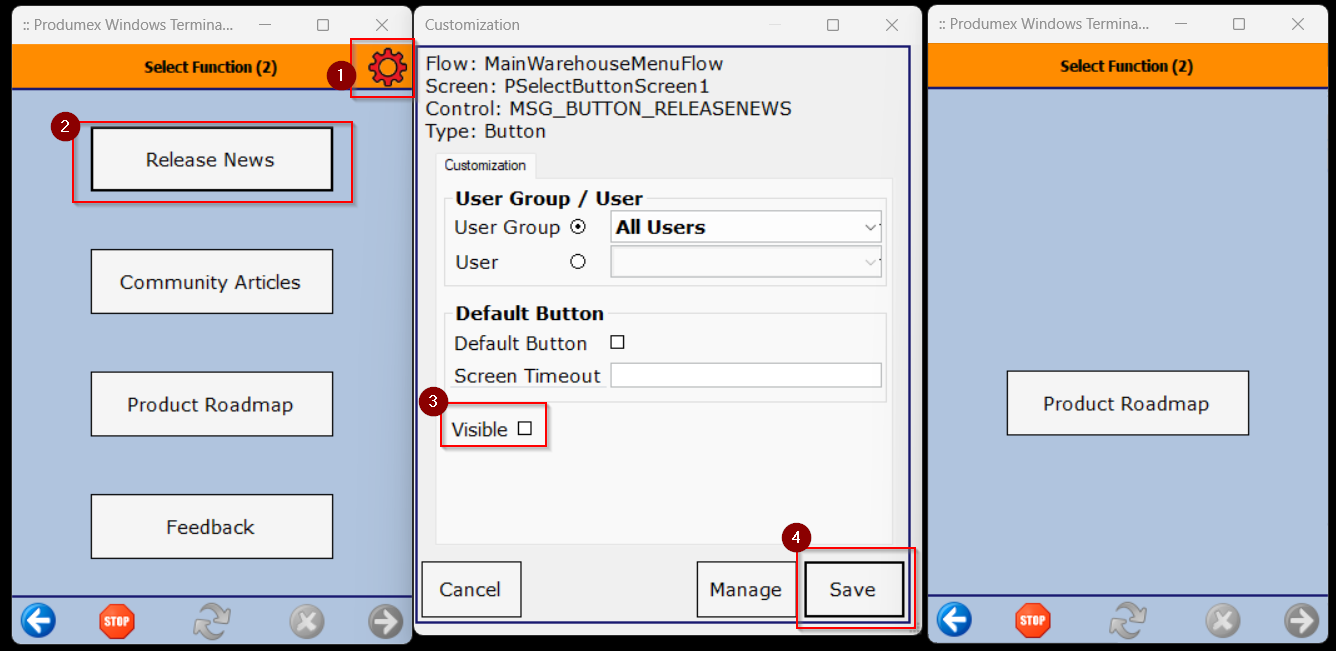
I hope this provides a sufficient workaround.
Iniciar sesión para dejar un comentario.