Final QC certificate over batch summarizing in operation QC

In several industries, they extract samples before doing the final production entry to adjust the mixing. This is a problema as these measurements normally should be summarized at the end in a certificate to be sent to the clients. As the QC is done over operations, the link to the batch number is not direct.
A nice to have could be to be able to print a report or to create a document itself with the controls done over the routing at the end of the work order, where we were able to check all the measurements done.
Comments
4 comments
Hi Luis,
you can create a crystal report for this and can print this in the last routing position over small customizing
regards
Martin
Thanks Martin for your answer, but I was thinking on another kind of performance,
We use to do something similar (but from the delivery note), but the thing is we cannot have the functionality of Beas quality over batches (block/release batches, inventory transfers, QC in traceability report), we don't have any document within the system to check and queries are hard to do.
Something like a final certificate, stored in a table, that can be managed over system screens (client and terminal), would do easier this job.
I opened few weeks ago a request to inherit analysis from semifinished to final products (Inheriting QC from semifinished to finished product – Boyum Helpcenter (boyum-it.com)). Well, this is something that can be included.
At the end, the purpose is to store the QC where we need (linked to the batch of final product not to the operation or the semifinished batch).
Hi Luis,
A product can be created from different batches, all of which have their own quality assurance order. These in turn can also be created from different batches.
In the different projects I have seen that always a product specific report has been created (only consideration of this material or sub-material position, no consideration of mixtures etc.).
As a standard solution it is very difficult to create something that could be suitable for multiple customers. We can only provide support here.
regards
Martin
Hi Luis,
we've a nice function for trace batch/seriales (the function, which is used from beas/serial batch tracer)
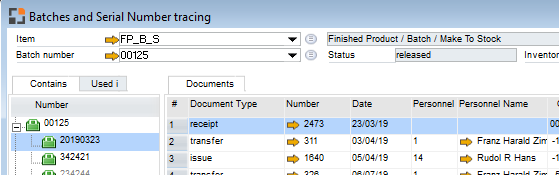
this function create a report in table BEAS_REPORTAUSWERTUNG
You can execute this BEFORE creating the Crystal report. The Crystal report can use the generated information to create own report.
This help you to find correct batch/serial Numbers in every level of the product structure.
object=ue_chargenbuchung=tracerreport=[itemcode]=[distnumber]
or
object=ue_chargenbuchung=tracerreport=[itemcode]=[distnumber]=[distnumber]
This create the report and return variable "id"
Please sign in to leave a comment.