Goods Issue VS Allocation Warehouse - Automatic Pre-Allocation Answered

Hi,
We have an issue where the warehouse used in Goods Issue is not the warehouse assigned on the BOM. This happens during both time receipt and manual material issue.
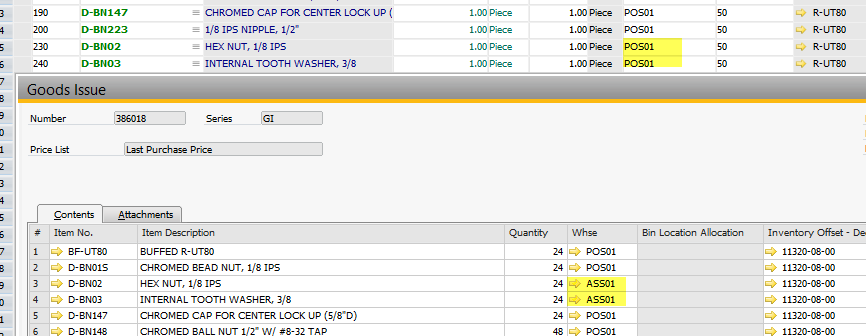
There is no reservation /allocation made for these items, so the expected WH that will be used by the system is the warehouse listed on the BOM.
Further reading on your online documentation lead me to this setting, although I am not sure where it is exactly on the configuration menu: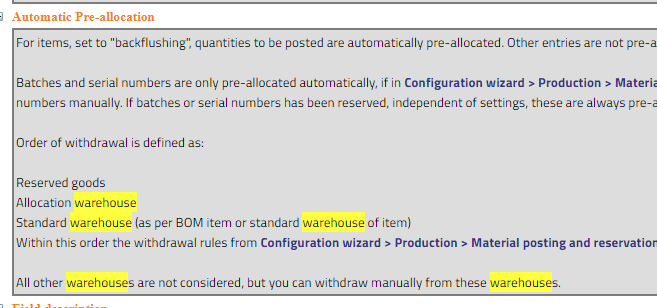
Does this mean that items with Issue Method set to Backflush on the item master data will use stocks on allocated WHs when there isn't any reservation/allocation made? And when there's no stock on other allocation WHs, the BOM WH will then be used as per the order of withdrawal on the pic above?
Hope you can clarify. Thanks.
Comments
9 comments
Hi Jun,
exactly. Program is working as described.
regards
Martin
Hi Martin,
Thank you for confirming.
Regards,
Jun
Hi Martin,
I think I read somewhere a configuration setting where the BOM WH is the only warehouse that will be used on backflush. I'm trying to find it again to no avail. In case there really is such setting, will it have an impact on reservation/allocation we currently have right now?
Regards,
Jun
reservation and allocation have always higher priority
Hi Jun, is the question answered? If yes, please mark it as "answered"
Hi Martin,
Sorry for the late update on this.
Is there a setting where the BOM WH is the only warehouse that will be used on backflush?
No other allocation/reservations will be made.
Hi Martin,
So I came up with this:
This way we can enforce goods issue only from BOM WH.
I'll really appreciate your feedback on this. Thank you.
Hi Jun,
exactly. Program is working as described.
regards
Martin
Hi Martin,
Thank you for confirming. This is now resolved.
Regards,
Jun
Please sign in to leave a comment.