Work order: Open Sales Order Answered

Hello together,
is there any posibillity to open the sales order directly out of the Work order.
It would be great if we could have also a yellow error beside the sales order like beside the customer (see picture below).
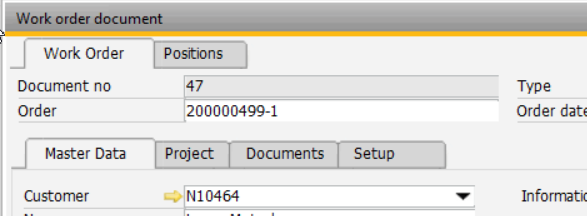
Is there any fast solution (eg beas script)?
Thank you in advance.
Comments
4 comments
Hi,
with Beas usability package or beas script this is simple to create
here a beas script example
fert_fthaupt_edit.src
global funciton form_loaded
item.auftrag.detailbitmap=opensalesorder()
end global
global function opensalesorder
if <dw_1.item.auftragint.value> n> 0 then
openwindow=fo_Order=<dw_1.item.auftragint.value>
end if
end global
regards
Martin
Hello Martin,
thank you for your feedback.
I have maintained the code in the BEAS Script and the yellow arrow already appears.
But then I get the following message.
I think it is because we need the Sales Order number without the position number. In this case it should open
SO 2000000598 (without the -1 for the position).
Is it possible to adjust this in the script?
Thank you very much in advance.
Best Regards
Hi,
oh sorry,
SalesOrder.DocEntry is not SalesOrder.DocNum
in auftragInt only the DocNum saved. We must read the correct docentry from BEAS_FTPOS.DocEntry:
global function form_loaded
item.auftrag.detailbitmap=opensalesorder()
end global
global function opensalesorder
select top 1 "BEAS_FTPOS"."DocEntry" into :ll_docEntry &
from "BEAS_FTPOS" where "BEAS_FTPOS"."BELNR_ID" = <dw_1.item.belnr_id.value,#0> and "BEAS_FTPOS"."DocEntry">0
if <ll_docEntry> n> 0 then
openwindow=fo_Order=<ll_docEntry>
end if
end global
Hi Martin,
it works perfect now.
Thank you very much.
BR
Björn
Please sign in to leave a comment.