Generate an inventory transfer line for each quantities selection line

Hi Dev Team,
with Beas 9.3, in the external supply mask, selecting multiple quantities for the same item \ batch \ warehouse generated multiple lines in the stock transfer document.
Now with Beas 2021 the generation of document lines has been optimized, thus creating a single line with respect to N material selections (for the same item \ batch \ warehouse)
Is it possible through the script\parameter to return to this condition?
Comments
1 comment
Hi Donato,
a small trick can help:
First we must catch the event. WindowEvent not available. But the click on "all provide"
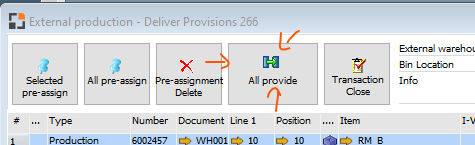
This element has 3 objects (you see it in debug window if mouse is over)
Means: we must catch 3 different objects:
global function dw_5_item_sendextern2_t_click
end global
global function dw_5_item_sendextern2_p_click
end global
global function dw_5_item_sendextern2_b_click

end global
The system execute "object=ue_reservation=transfer"
object=ue_reservation=reswindow=transfer=towarehouse=<dw_5.item.stagearea.value><tab>&
... cardname=<dw_5.item.externalname.value><tab>comments=<dw_5.item.stagecomments.value>
We must send additional parameter: batchgroup=false
With this property the system don't group it
It's not possible to change this command. But we can send a parameter inside the comments string:
dw_5.item.extnotes.value=<dw_5.item.extnotes.value><tab>batchgroup=false
Means: over the comments string we send additional property
BeasScript is complete string oriented. This is the reason, that we've this possibility.
Complete Customizing for this window
global function dw_5_item_sendextern2_t_click
changeComment()
end global
global function dw_5_item_sendextern2_p_click
changeComment()
end global
global function dw_5_item_sendextern2_b_click
changeComment()
end global
global function changeComment
dw_5.item.extnotes.value=<dw_5.item.extnotes.value><tab>batchgroup=false
end global
Please sign in to leave a comment.