Pivot row headers should fit the full text, or keep the column width saved in the editor

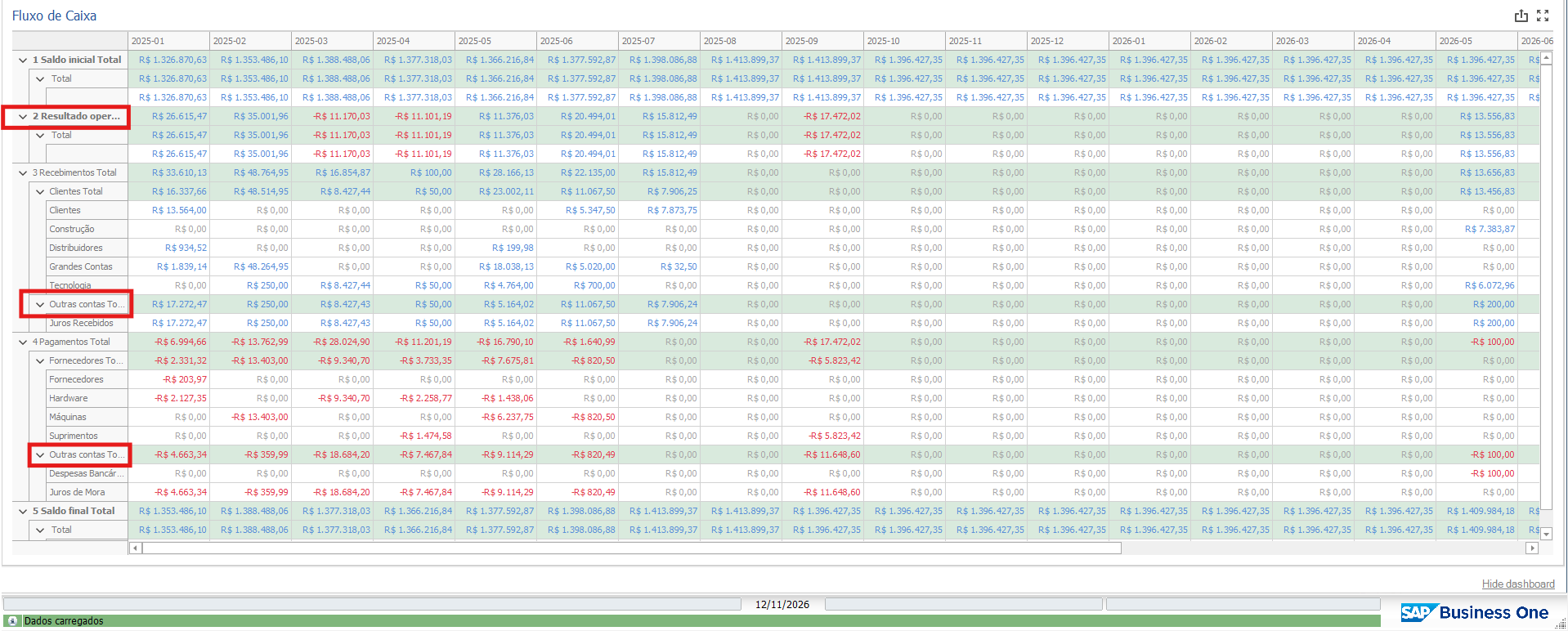
At the moment, the row headers of a Pivot are cut off when the text is longer than the column, so longer names end up shortened with “...”. In my cash flow matrix, for example, “2 Resultado operacional” shows as “2 Resultado oper...”, and the same happens with other group and subgroup names.
I’ve tried widening the row header column in the dashboard editor and saving, but the width isn’t kept. When the dashboard is opened again, the column goes back to its original size and the names are cut off again. The only way to read the full name is to resize the column by hand every time, or to hover over it.
What I’d like to see:
- An option for the row header column to automatically fit the longest name, so the full text is always shown by default.
- Alternatively, the column width set in the editor should be saved with the dashboard and kept every time it’s opened.
This would make Pivots much easier to read, especially in financial reports where line and account names tend to be long, and users shouldn’t have to resize columns every time they open the dashboard.
Comments
0 comments
Please sign in to leave a comment.