Add Indicator when a result is limited by "Maximum number of lines for stock queries" setting in Query Stocks

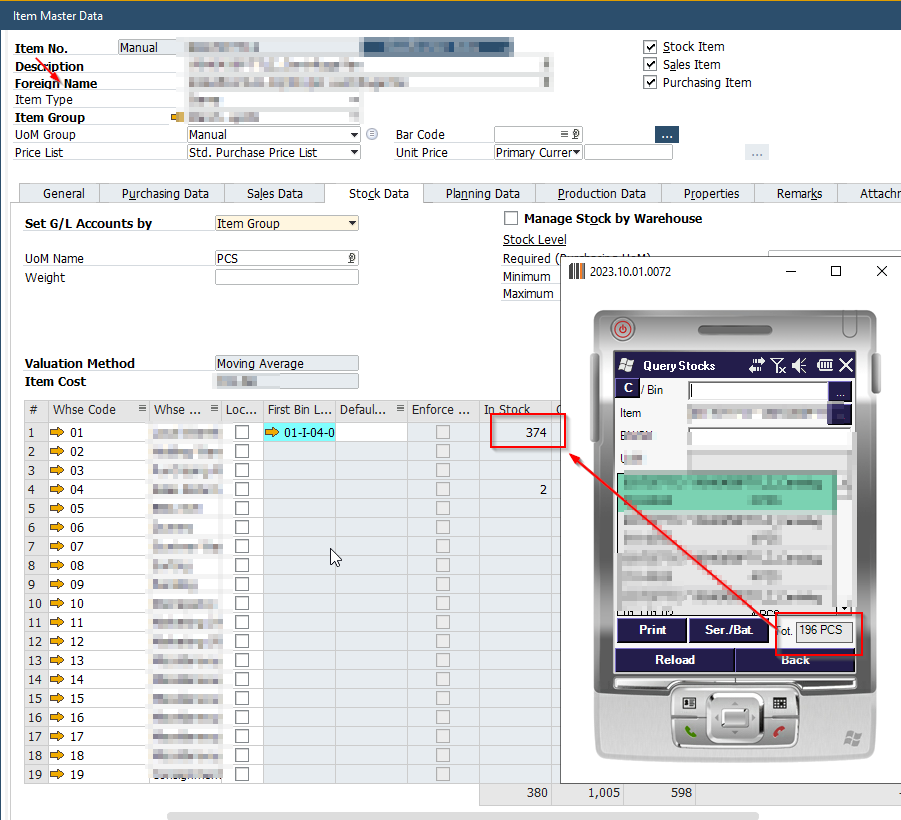
Add an indicator or pagination to Query Stocks function when more results than the limit were found. For example add + indicator when more than displayed 196 are available but total number is not calculated because of the setting. Scanner only users are unaware of this settings limiting what they see and that the shown total quantities could be truncated.
In Query Stocks Screen or any other screen that makes use of query stock function the results are limited by setting Produmex Scan General → Maximum number of lines for stock queries to display (more than 100 may cause performance issues) Default value is 100, leaving it blank for unlimited does not work. See official documentation under 9. Other [Produmex]
Means when you have an item on more than 100 locations it will only show the total Quantity calculated over these 100 locations and not the real total quantity of an item in warehouse. User who work only with Barcode Scanner Device and Produmex Scan are totally unaware of this setting and impact. It can lead to misconcetion that total quantity in scanner is the real total quantity in warehouse, but it isn't.
A simple indicator could help to identify truncated results and add trasparency for warehouse workers. To not impact performance a query of set limit +1 could show if more results than limit exist and then add the indicator.
Comments
0 comments
Please sign in to leave a comment.