Cannot tab to next field in order line Answered

I have created a UF to transfer a field from the header into a field in the order line.

I have created a Validation so the UF gets executed. The field is being transferred to the order line, but I cannot tab to the next field in the order line. It keeps 'hanging' in the field right next to the field where the value was transferred to.
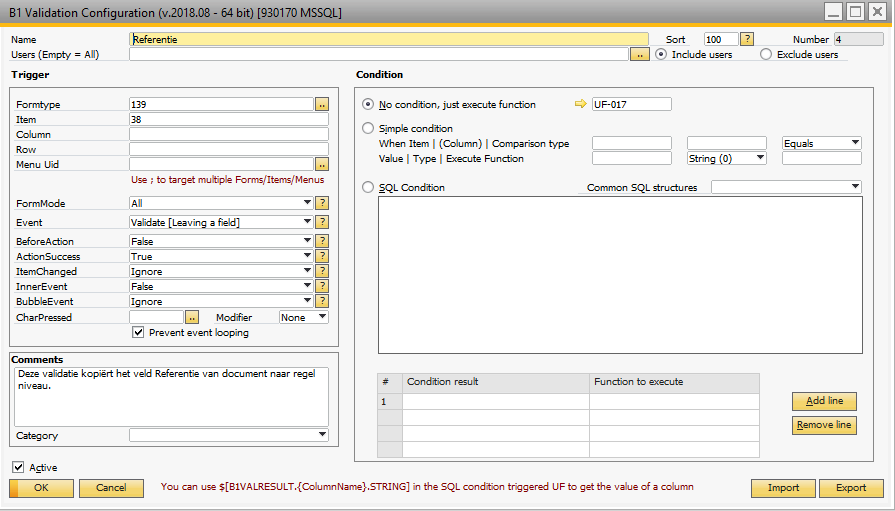
What do I have to change to get this work.

Comments
2 comments
Hey,
If the text value matches the actual article name, then you should be able to leave the field.
If not, then unfortunately this is not possible since the SAP UI-API does not allow us to do it.
Please vote for our idea in the SAP webpage to change this:
CTRL + TAB SDK Support
https://influence.sap.com/sap/ino/#/idea/131306 (Allow us to give you the option to set text via CTRL+Tab in macro (example overwrite item description))
Best regards,
Thomas
As the text was matching the actual article name I have been looking at the situation with a collegue.
If the text value matches the actual article name, then you should be able to leave the field.
The case was that the Column field was not filled with a value. In the documentation I found this which describes why the Column field should be provided with a value.
If the item that you are working with is on line level you will have to provide the column that you are working with (else again ever of the lines columns would react to the trigger).
We have set BeforeAction to True, ActionSuccess to Ignore and InnerEvent to False.
Please sign in to leave a comment.