Added Function Button Answered

Hello, i added a function button to sale order form, it created a massive gap that i need to get rid of, i removed the button but the gap is still there, how do i fix this?
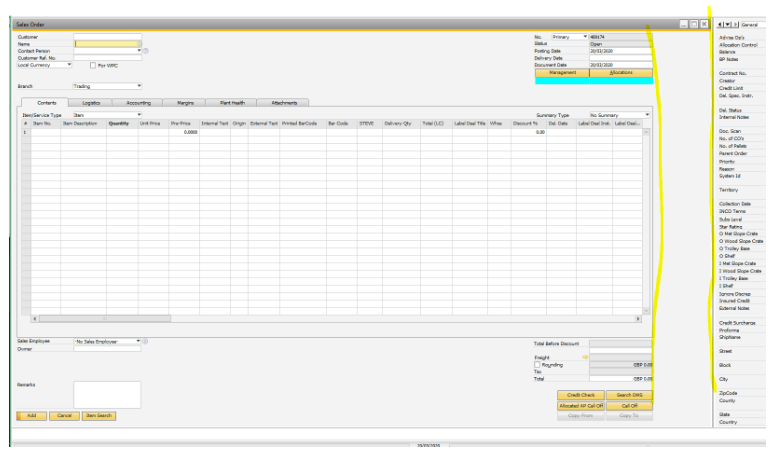
Hello, i added a function button to sale order form, it created a massive gap that i need to get rid of, i removed the button but the gap is still there, how do i fix this?
Comments
11 comments
Function Buttons are meant to be on the side (aka the gap) so you must have moved the buttons afterward
Best workaround/hack for this is to go to you Function Button Config and set the Button Width to 1pixel so the Function Button config thing it should not leave room for them
hi, thanks so much for the reply, legend!
Ok, seems strange because the gap only appeared after adding the button,
previously the content grid went right to the edge of the form...
i removed the button, so there are no function buttons at all now, should i add one in at 1 pixel?
will that shrink the gap?
Maybe you can create a custom button with IPT and add a click validation ..
just a thought ..
good idea, but would that return the form to normal?
I think if you don't have funcion buttons configurations on the form ID it should
give it a try ..
hi thanks for replying,
i removed the function button but the gap persists, that's my issue
Yeah I'm not sure , but if you have no more buttons on the form and you right click to add buttons and click Remove on the form to delete the definition does that work ?
as follows :
just to clarify this will remove all the buttons configurations you have on that form (?)
that's great, that seemed to work :) thank you.
how does one create a button via the IPT?
use the item placement tool to place a button , create a custom one on the bottom part of the IPT
like so :
Please sign in to leave a comment.