Work Order (Macro) as a default print Planned

Hi,
Work Order (Macro) as a default print, Please find the attached screen shot for your reference.
Regards,
Mahesh

Hi,
Work Order (Macro) as a default print, Please find the attached screen shot for your reference.
Regards,
Mahesh
Comments
17 comments
I don't understand the requirement. Can you rewrite the request better?
The print format should select as default for print and preview when user try to print the work order, we don' see any setting that can be set Work Oder as default print as shown in the screen shot? please let me know if this is still not clear we can send you recording
Hi Srinivasula
your problem is this window. Correct?
we check this.
Hello Srinivasula
if you've B1UP and beas 9.3, you can work with right button functions.
Thank you Martin
but customer don't have B1UP, can this be done with standard beas Screens?
Regards,
Mahesh
Hi Mahesh,
we working on a solution in the standard version too.
regards
Martin
Hi Martin,
Customer is running B1UP 2017.1.1.0 and the beas version 9.2 PL49, but we don't see button functions described in screen shots.
Regards,
Mahesh
Correct. Beas Usability Package is only available with
beas 9.3 PL 0 together with Boyum Usability Tools
We searching parallel another solution.
Hi Martin,
My customer Troy lighting just upgraded SAP business one software.
They are now using Beas 9.3 PL0 (0.29) and boyum B1UP 2018.08.
Both add on are the latest version. When I right click the work order, I still did not see the option you have on your screenshot. I have attached what I have for you. Can you please let me know how to activiate the edit B1 function option?
Thanks,
Rong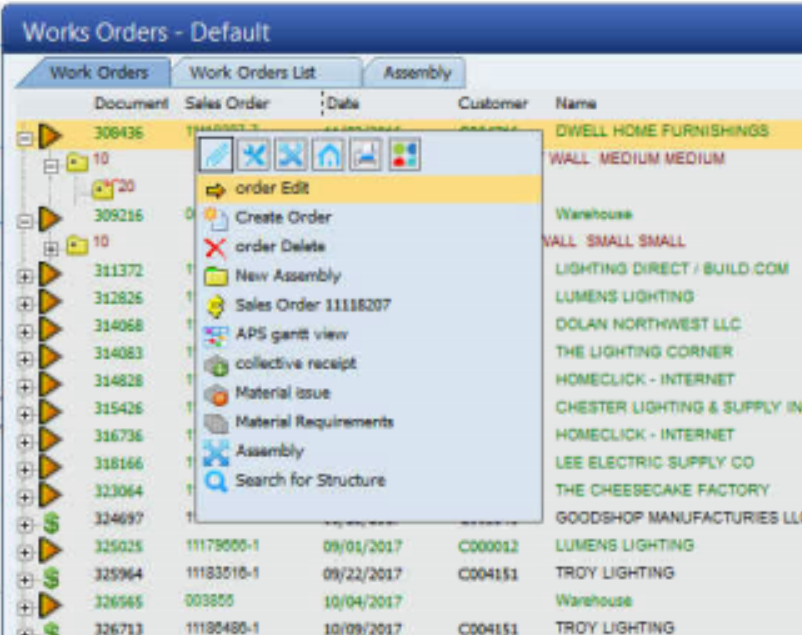
Hi Rong Zhang,
Rosi made a very nice Video
https://youtu.be/mNujRw9fSDo
regards Martin Heigl
Buen dia.
Favor, ojala puedan ayudarme, quisiera imprimir el informe Orden de trabajo incluyendo el código de barras, hasta ahora no logro saber desde donde podría jalar este código.
Favor de poder ayudarme en indicar como editar el formato Crystal o como hacer para que jale el código de barras requerido en formato Orden de trabajo propio de Beas.
Atte
Carlos
Hello Carlos,
please write in english
if you install beas in normal way, the system install the barcode font automatically.
You can download the font from here
http://beascloud.com/download/beas/reportviewer/barcodefont.zip
unpack
open font settings
copy all font files to this place
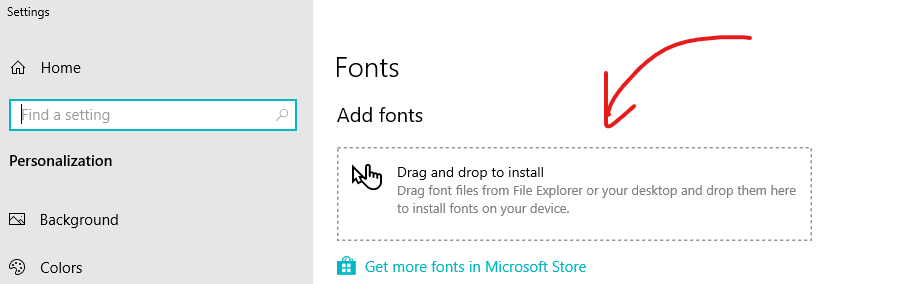
Hola Carlos,
Aparte de descargar el fichero que dice Martin, debes abrir el formato (normalmente está en Program Files (x86)\beas software\beas\program\report) y cambiar la fuente de los textos de los códigos a code39, y guardar.
Estimados, muy agradecido, por sus apreciados comentarios.
Solo una consulta mas por Favor Luis Abellaneda, cuando mencionas cambiar la fuente de los textos, donde lo realizas, en la carpeta de reportes estan los crystal reports beas.
favor tu apoyo.
Estimados,
Muchas Gracias, quedo perfecto.
Atte.
Carlos Calderón
Hello,
is there meanwhile any solution for customer without B1UP?
Thank you in Advance.
Best Regards
Björn Greber
Yes, with follow script:
Please sign in to leave a comment.