B1 Print and Delivery Report Action - recipient Email ID not exists error Answered

Hi Experts,
We have a user-defined window which stores all the Email Ids of Business Partners. So, I have a requirement while adding AR Invoice, the document(AR Invoice) should be mailed to the corresponding Business Partner mail id which will pick from the user-defined window. Now, I want to display a custom error message in the bottom of the screen if the Email Id does not exist in the user-defined window using MACRO in Universal Function.
Is it possible to call Universal Function from the Report action(Conditional Action)? If yes could you please guide me.If not then how to display the custom error message to the user?
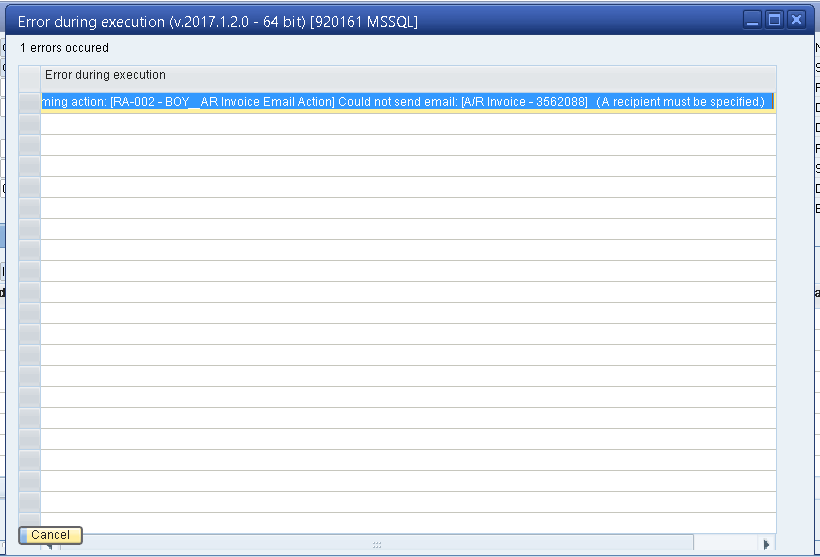
Note: By default Boyum displaying an error "A recipient must be specified" this error message should be shown in below status bar of SAP using MACRO in Universal Function. Attached the default error screen from Boyum
Thanks in Advance,
Naveen.
.
Comments
1 comment
Hello Naveen,
What you can do here is the following:
-Create a B1 Validation with the event Data add. This validation system will be executed before the document is added. This will contain an SQL condition that validates if the email field is empty or not.
-Add a Universal function type message that send this error to the customer before the document is added.
You can also use this B1 vaidation system to execute the error message or the B1 P&D action of sending the email, this last option is using a macro with the command P&D.
Please sign in to leave a comment.