Stock transfer custom query Answered

Hi,
Stock transfer screen don't allow customize list of displayed items by query. In my opinion this should use the same custom query like stock query view (bx_mobile_wh9_querystocks_query_custom), or provide own custom query.
Comments
3 comments
Hi Adam,
Thank you for your feedback.
If your request refers to the first Stock Transfer screen (the one listing available items), this screen currently does not support customization by query. To enable it, the screen design itself would need to be modified — while it’s possible to insert a value in the Item field, the system immediately proceeds to the next screen instead of filtering the list results.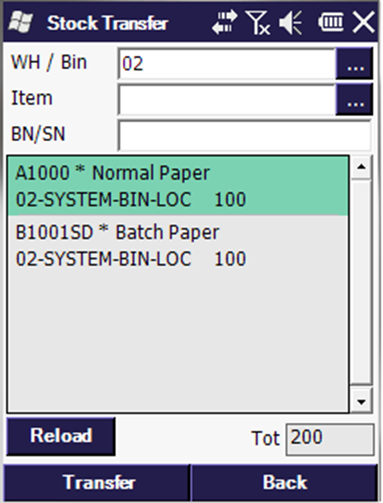
However, please note that:
1.The
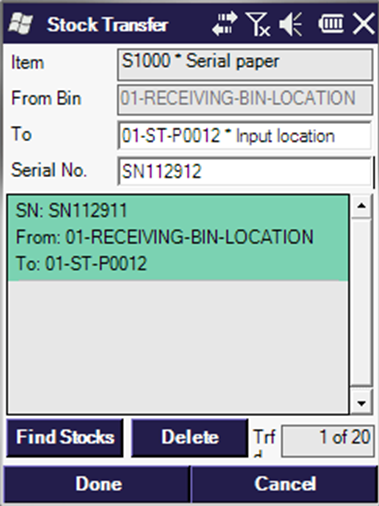
bx_mobile_wh9_querystocks_query_customquery can already be used to filter the results shown in the “Find Stocks” list once the item is selected.2. The Stock Transfer Request flow does support customization through the
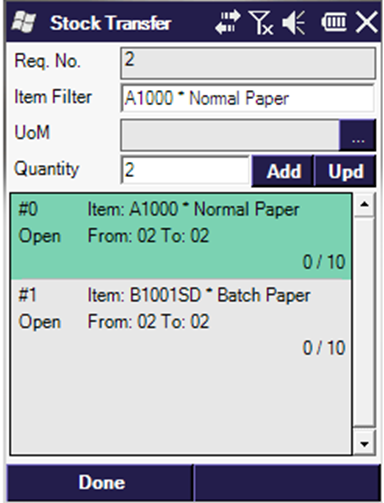
bx_mobile_wh9_stocktransferrequestlines_query_customquery, as this screen includes an Item Filter field designed for that purpose.Hi
Client have over one hundred warehouses and want to filter because warehouse employee use only couple of that.
Adam,
Then just create a custom field, where only these warehouses are allowed, which feeds the warehouse field on the screen. I think that's the kind of workaround we are using nowadays but as soon as the new custom dropdown object is available https://www.notion.so/boyum-it/SCAN-Create-a-Dropdown-Object-to-be-used-on-custom-screens-18cbe94de47e80a08358e3b03c6e27d5 on Scan 2025.12 the task will became easier.
Please sign in to leave a comment.