Does Printing a Document Using Print and Delivery Set the Value of the Printed Field to 'Y' Answered

I have a query in a custom mass delivery that tries to use the Printed field so I don't print documents twice, but it doesn't seem to be working. Here's the query in question:
SELECT DISTINCT DocNum, DocEntry, CardCode FROM ODLN
where cardcode in('500393','500394') and docstatus= 'o' and Printed='n'
Also, is there another field, perhaps a Boyum field on a UDT that shows whether an item has been printed using Print and Delivery?
Comments
1 comment
Hi,
Yes, there is a field you can use to mark a document as being printed available in the report action it's self (see screenshot - the print marker is available on print type and email, my example just shows an email type).

You have two options, you can either modify the standard mass delivery for delivery note DP-004 and add your custom where clause there (if this is the only mass delivery you are looking to run for deliveries this should be fine), or just duplicate it adding your where clause, giving it an appropriate name. Then you would build a report configuration around this new mass delivery, and in the related report action mark the printed flag.
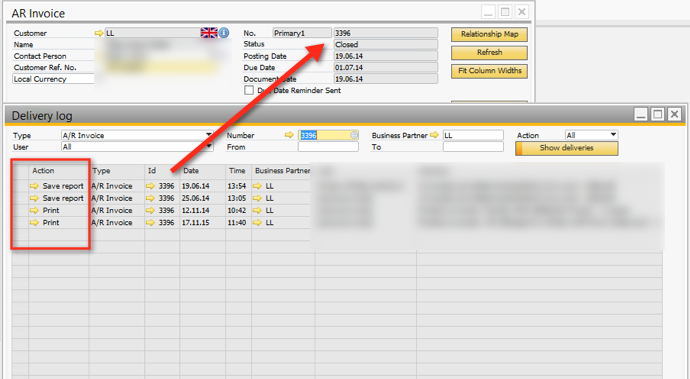
As for your second question on the documents being marked as printed by Print and Delivery, you may or may not already know but any document if you've enabled the Print and Delivery log from the main settings, you can right click on it and go to B1 Print and Delivery / Deliver Log.
This shows a table of all the events handled by P&D on the document, by user, type etc so you can see exactly what's happened over the life of the document, i.e it's been emailed three times, printed twice etc. If you wanted you could build a custom query directly on the delivery table which is [dbo].[@BOY_85_DEL_LOG] - taken further you could if you wanted, build a custom Tab with B1UP within the document to show all the related P&D events to the specific Document number you're on joining the Delivery log table the document table(s).
Please sign in to leave a comment.