Auto Selection of Batch Numbers Answered

Hi,
I tried for auto selecting of Batch Number while Adding Invoice from "Batch Number Selection" Window using Line Loop, But this looping functionality is not working on this Window.
This Auto selecting functionality with line loop concept is working for only first item, not for remaining and Displaying Error Like this:
I created B1 Validation while loading Batch Number Selection Window after pressing Add Button on AR/Invoice Window like this:

And the Universal Function with Line Loop type for this Validation Is :

and the Line UF looks :
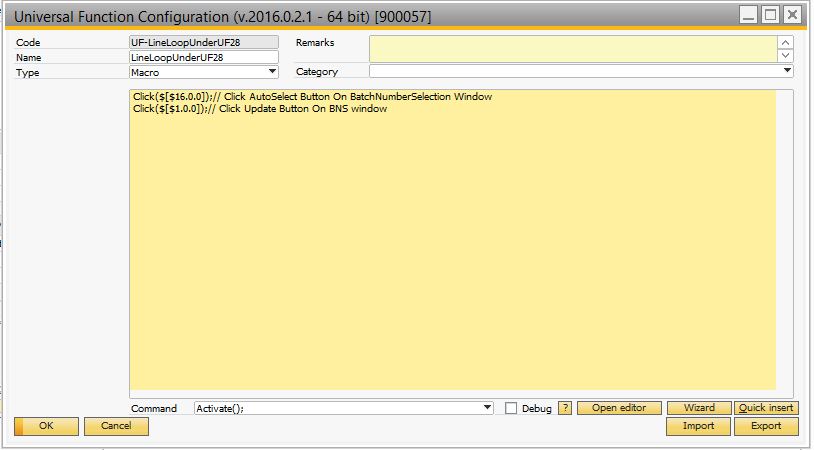
And My Batch Number Selection window looks like this:

Why the Looping is not working in this Scenario.?
Comments
6 comments
Hi, please see the following screenshot for the same idea using serials:
http://screencast.com/t/z52yQH4fym5
Hi Naama,
I tried to follow the screenshot you provided for selecting batch but the issue is it doesn't go to the next line once it select the batch for the first line item
How to make line loop to go to the next row once you have finished selecting batch for the first item?
Hello Jun,
Your Macro is not complete, what you need to to is open the window and select line by line with an additional macro that clicks the Button and save the changes.
This is advanced support, so please contact your partner for further assistance.
Hello, I've created the following configurations and is working fine so far...
NOTE: it is going to take the very first batch available on the list of available batches and is going to be executed as soon as the batch selection window is loaded.
I am tried create procedure for update batch data in sales order.
I created Button "batch test" in Sales Order and some macros (see print screen).
It successful update first line of batch, and after that it continue update the same line with errors and don’t jump to next bath line.
Can you explain why?
Hello María,
I suggest that for complex configurations like this one you contact your Partner. He will provide more information and will be able to analize the document and transactions.
I'm sure your Partner will provide the solution according to your needs.
Please sign in to leave a comment.