Open a form in search mod by default Answered

Hello,
I'm looking for a "trick" to open a form in search mode by default instead of add mode.
For example if you open "Payment terms setup" the form open in "add" which is "dangerous"
Any idea?
Thank you
Comments
12 comments
Hi,
Unfortunately, that is not possible in some documents. It is a limitation of the SDK.
Thanks, Naama
Why not just make a button with a macro like below?
activate (theFormYouWantToOpen);
Activate (1281); //sets to find mode
Thank you for your answer.
I want it automatic to avoid mistakes and because instead of making a button it is faster to click on the SAP search icon :=)
Create a validation on form load, and do the same what George suggested.
Thank you all for your help.
I did try a validation on form load with "Before action = false" so it triggers at the end but it does not work because it triggers before SAP has finished loaded.
activate(1248) return an error :
Macro error in UF-034: System.Exception: Menu - Cannot activate a disabled menu item [66000-75] [Macro Command: Activate(1281)] Macro Enviroment parameters: [Current Form: 177 - Payment Terms - Setup] [Source Row: -1] [Target Row: -1] [Break: False] [Initial FormType: 177] [B1UP Version: 2015.1.0.0] etc...
and SendKeys(^F); //Search do not return an error but does nothing.
In the B1UP manual it is written:
Form Load = "A window was opened (Please note that in some cases Form Load cannot access the window opened (since it is still opening)) "
Maybe that's the case here!!!
Can any expert advise on this as I have a similar error when trying to automate switching between windows. "Cannot activate a disabled menu item..."
Has anyone got anything more on this? How do we know which forms it won't work on. I'm trying to do the same on Project and getting the same error. Is there a work around?
Thanks,
Scott
Helo Scott,
Like Naama mentioned unfortunatelly this is an SDK limitation and we can't include this as a development request.
I manage to have it works.
Here is how to setup the Validation configuration
and the create a Universal function like this
Then it works like a charm :=)
Patrice
Patrice,
Your validation is on a menu click (not specified) but doesn't the form still open in Add or Update? What triggers your validation?
Thanks,
Scott
Hello Scott,
Yes I did indicate that you have to put the menu number and select event = Menu click
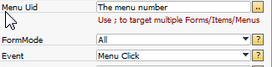
Yes the form open in search mode, that the reason of this post.
All the information are on my previous post, look at every fields and it should work fine for you.
Enjoy
Patrice
Hi All,
I had same problem while trying to create validation on form load, with little read in this forum and brainstorm with my Colleague we have managed to get it to work just like for Patrice, what I think confused people was that no one was sure what menu uid to use-this has to be an actual MAIN MENU uid for document you want to open. so for my example (Sales Order) menu uid is 2050, validation and UF are looking like this:
Hope this helps!
Art
Please sign in to leave a comment.