How to avoid inactive users to show up in listbox at service call that refer to employees

Hello,
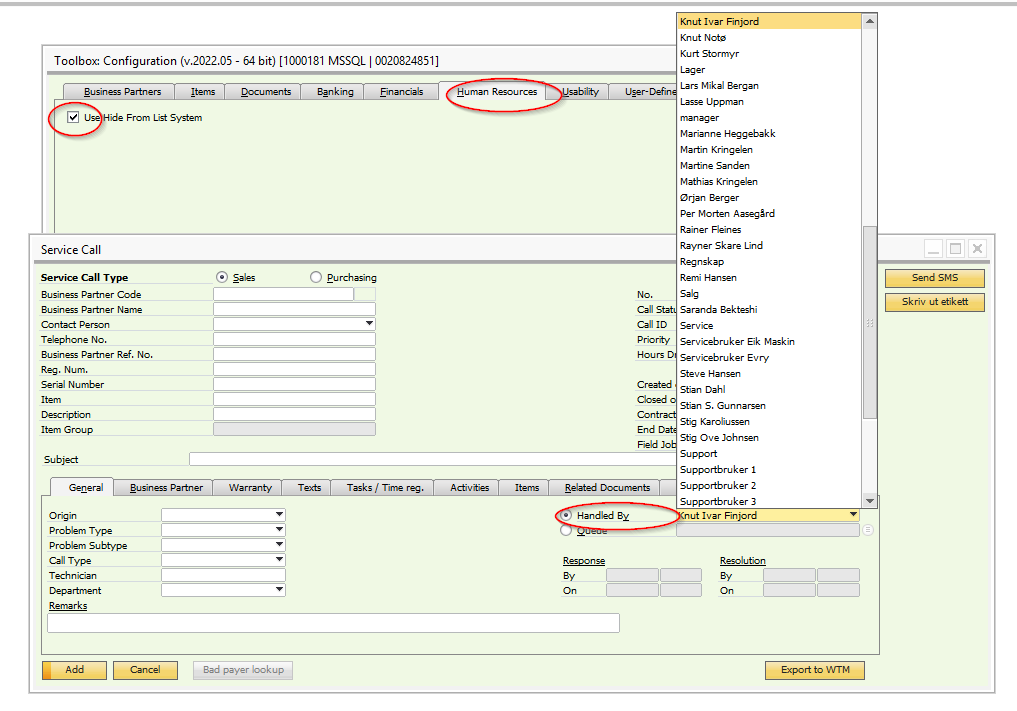
I'm looking for how to hide inactive employees from list in service call below "Handled By".
I have chosen under Toolbox Configuration-Human Resources-Use Hide from List System, but this does not work.
I get anyway inactive employees in the list
Comments
3 comments
Try:
Thanks for reply.
I have also chosen that, but it only works on sales orders and outgoing invoices, but not on service calls unfortunately.
It looks like that is pulling from the Users table (OUSR).
Likely simply add a standard Formatted Search to that field based on a user query such as: SELECT T0.[USERID], T0.[U_NAME] FROM OUSR T0 WHERE T0.[Locked] = 'N' ORDER BY T0.[U_NAME]
Modify your Where clause as required
User simply clicks the magnifying glass instead of the drop down selector.
Please sign in to leave a comment.