Click "Add" on Popup Answered

I have a macro to mass enter payments based on reference numbers. It works for everything except I can't get the macro to click add on this system message:
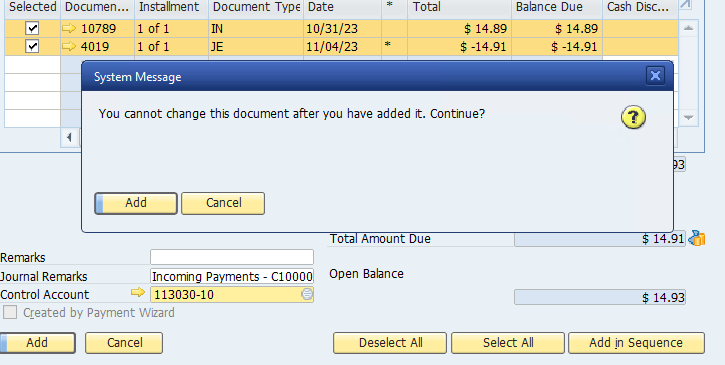
I've tried AutoPressNextPopup() twice as suggested in some old posts.
I've tried Activate() then click($[$1.0.0])
I've tried Activate() then click($[$10.0.0])
I'll take any suggestions
Comments
5 comments
Hi Chris,
Could you share a bit more on how you have tried to use AutoPressNextPopUp?
Did you put that before the action that triggers the add action? I have tried to replicate but this works. Example, had this as a macro on the incoming payment
AutoPressNextPopup($[$1.0.0]); // press ok on the pop up
Click($[$1.0.0]); // click Add on the incoming payment
So a colleague was not having this issue, as the system message did not appear.
However if we add the Reference (check no) as CC the systems throws the prompt, while using a number it moves along...
@Store10 = '[%0]' //AS 'Customer Number'
@Store12 = '[%2]' //AS 'Payment Amount'
@Store15 = '[%4]' //AS 'CheckNo'
Activate(2817); //activate incoming payment
Set($[$5.0.0]|@Store10); //set cust no
Set($[$22.0.0]|@Store15); //set check no as reference
Set($[$10.0.DATE]|@Store14); //set posting date
Click($[$37.0.0]); //click payment on account
Set($[$13.0.0]|@Store12); //add payment amount
Click($[$14.0.0]); //click add in sequence
Click($[$234000001.0.0]);
Activate();
Set($[$44.0.DATE]|@Store14); //set transfer date
Set($[$30.0.0]|@Store13); //add batch number as reference
Click($[$1.0.0]); // click ok
Activate();
Click($[$1.0.0]); // click add
//Activate();
//Click($[$0.1.0]); // click add
Activate(BOYX_9);
Hi Chris,
I did not understand this line: However if we add the Reference (check no) as CC the systems throws the prompt, while using a number it moves along... What is "CC"; what do you mean by using a number?
One possibility is to add a "PopFormStack()" command when returning from a sub-form before you 'Activate". This should then force the Activate action to occur on the correct form.
Also, have you tried using the "debug" mode on the UF so you can see exactly what is happening?
Will the PopFormStack() work on system messages that I can't suppress?
I doubt it.
How about changing:
Set($[$22.0.0]|@Store15); //set check no as reference
to Set($[$22.0.NUMBER]|@Store15); //set check no as reference
Please sign in to leave a comment.