How can I set the image path when I have created a new field (Picture)? Answered

Hello,
I have created a new UDF for select a Picture.
But i recived an error message.
You need to select a Path for picture.
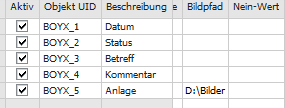
Well, i have add a path (D:Bilder ) in the Field "Picture-Path" with the Item Tool Manager , but it doesn´t work.
Regards
Jennifer P.
Comments
1 comment
Hi Jennifer,
As answered in the ticket, running the client as an administrator or fixing the permissions for the directory fixes this.
Thanks,
Thomas
Please sign in to leave a comment.