Macro Command to click a "Copy From" option Answered

G'day,
Long time user of B1UP but new to the forums, my apologies if this has been asked and answered but I could not find it.
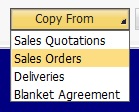
Is there a way in a Universal Function Macro to simulate clicking on the "Copy From" button and then clicking one of the options? Specifically, I want to simulate:
- Open an A/R Down Payment Invoice form
- Click on the "Copy From" button
- Click on the "Sales Orders" option
I can do steps 1 and 2 easily enough but cannot see a way to do step 3. B1 seems to pop a pseudo form with a matrix on it but I could not access it. Is it possible to achieve this in a Macro?
Thank you in advance.
Comments
3 comments
Hi Ian,
Try this in your macro:
Set($[$10000330.0.0]|Sales Orders);
Thanks,
Thomas
In a macro you can use a set command such as Set($[$10000329.0.0]Sales Order)
Excellent, thank you both.
Please sign in to leave a comment.