How to access dropdown (View Related Activities) menu using Macro Answered

We would want to place a button on the Business Partner Master then the button will have a macro to access View Related Activities.
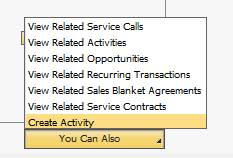
We would want to place a button on the Business Partner Master then the button will have a macro to access View Related Activities.
Comments
2 comments
Hi Adrian,
This is a bit tricky thing to do, but doable.
The way you do it is actually just with Set(); -function like this:
Set($[$540002072.0.0]|Create Activity); // Add new Activity
However, this only work once, since the value is saved to the dropdown-button and won't trigger anything the next time you run the macro.
But, as a workaround, you need to open another window first through the button and close it.
In this example, I’m creating an activity, to make it work every time, i'm opening a quotation form first so it works every time.
-----
Set($[$540002072.0.0]|Create Quotation); // Add Quotation
Activate();
AutoPressNextPopup($[$2.0.0]);
Close();
Activate();
Set($[$540002072.0.0]|Create Activity); // Add new Activity
Activate();
-----
It’s a bit weird, but it works. There could be a better way to do it too, but this is the only one i've been able to find out.
Also please notice, that this will work only with english language, if you have any other language, you need to change the set-functions accordingly.
Thanks,
Thomas
Hi Thomas,
Thank you very much for answering my post.
Best Regards,
Adrian
Please sign in to leave a comment.