beas: close work order position to other date Answered

Question: i need a solution to close a work order position in other time period
Idea:
Work order structure window
New button "Close" - ask for date and then close this position
1. Open the window "Work orders"
2. Tools - Extensiosn for Clients
3. Insert follow script

windowevent open
create=button=name=closeentry,menutext=Close position,text=Close
end event
windowevent click closeentry
setvar=e_date=2016/12/31
if <belpos_id> n= 0 then
 messagebox=error$Please choose a work order position
 return failure
end if
input=Close <belnr_id>/<belpos_id> for date=e_date=<e_date>==cancel
question=do you want to close work order <belnr_id> position <belpos_id> for date <e_date,date>==cancel
object=ue_api_wo=closeposition=<belnr_id>=<belpos_id>
setitem=abgkz=J
end event
Reopen the window
Now a new button is available

if you click on it:
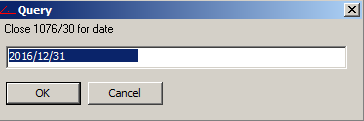
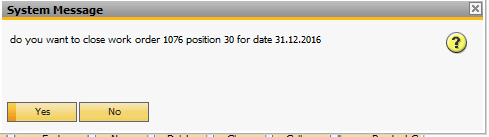
if you click on "yes" beas close this work order position or the complete structure.
If all positions are closed, beas close the work order self too
Comments
2 comments
Hello Martin
We are on the process of implementing Beas in our manufacturing Plant, but we're late on the Closing process of the orders for month of April and we need to close it with a date of april not in May.
You think we can do something similar to the example you provide here ?
I really appreciate your response.
Thanks in advance
Jorge Lainez
Anduro Manufacturing
Hi,
in the script the system is asking for the date. Where is the problem?
Please sign in to leave a comment.