How to find the selected row number of Form table in a Macro?

Hi
I am working with SAP B1 Blanket Purchasing Agreement
When the user chooses to close a line on the agreement I want to warn them if there a associated documents attached to the line in question still open
However, when the user clicks on the table row number to select the row and chooses <right click> close row the following key words return -1
$[CURRENT_ROW]
$[ROW]
Is there a way to calculate the selected row row number in a macro ?
For completeness here is a screen shot and the macro code. If I hard code the row number (as the example below) the code runs as expected
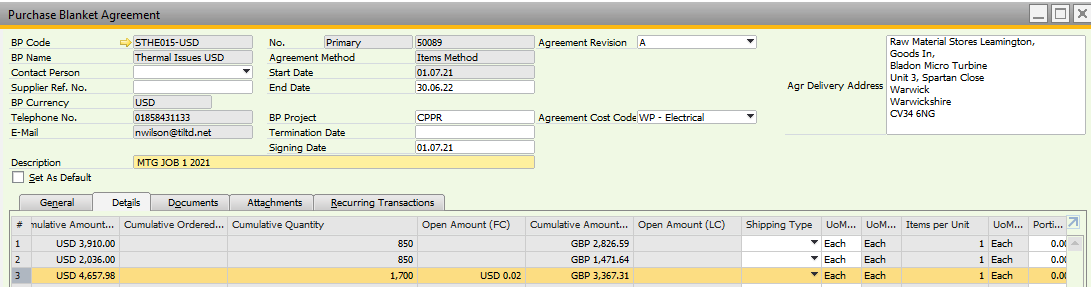
--Debug
MessageBox(Current Row number $[CURRENT_ROW]);
MessageBox(Row number $[ROW]);
MessageBox(Column $[CURRENT_COLUMN]);
MessageBox($[$1250000045.1320000033.0.SELECTED]);
--Procedure
@Store1=$[$1250000004.0.NUMBER] --Grab Doc number
@Store2=2 --Grab Selected Line Number and subtract 1 for SQL
@Store3=3 --Grab Selected Line Number for display $[CURRENT_ROW]

MessageBox(Checking Doc @Store1 Line @Store2 for open documents linked to the line);
@Store4=SQL(EXEC [BJL_StagingDataBase].[BJL_Purchasing].[GetOpenRowsLinkedToPBALine] @DocNum = @Store1,@DocNumLine = 1) --Grab number of open rows
 If (@Store4>0)
    Begin
    Statusbar(Doc @Store1 Line @Store3 linked open document rows|E)
    MessageBox(Doc @Store1 Line @Store3 has linked open document rows.<NEWLINE>Please do not close the line until these documents are closed or unlinked from the PBA.<NEWLINE>Failure to do this will stop processing of the linked Document.<NEWLINE>See Documents Tab for details<NEWLINE>The BPA status has been set to "On Hold" );
    Set($[$1250000036.0.0]|F)
    Focus($[$1250000044.0.0]);
    Statusbar(Doc @Store1  status set to "On Hold" |W)
    End
 Else
    Begin
    Statusbar(Doc @Store1 Line @Store3 has no linked open documents|S)
    End
Comentarios
0 comentarios
Iniciar sesión para dejar un comentario.