UFFI Import Stuck in “BOYUM_IN_PROGRESS” – CSV Not Moving Further Respondida

Hi Everyone,
I am facing a strange issue with Boyum UFFI import.
For more than 1 year, my UFFI C# code has been working perfectly and Item Master Data was uploading successfully into SAP Business One without any issue.
But suddenly, the process stopped working.
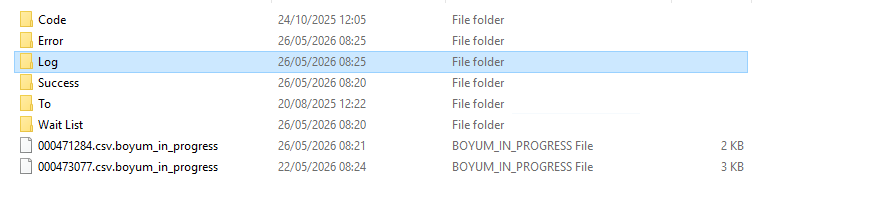
Now the CSV files are getting stuck in the BOYUM_IN_PROGRESS stage and are not moving further to Success or Error folders.
Current situation:
- CSV file stays as
.csv.boyum_in_progress - No data is getting uploaded into SAP
- Restarted Boyum services
- Restarted the server as well
- Still the same issue
- Log File: File already named .boyum_in_progress. Cannot work on it. | Exception: System.Exception: File already named .boyum_in_progress. Cannot work on it.
Comentarios
2 comentarios
(Please note that as we are user-driven we can't guarantee that your request will be met unless it gets many votes and/or fit the product vision)
Read more about the Feature Request process here
[Internal Id: 162233]
Not Received any answers from Boyum or anyone. its sad to post on the community forum.
Iniciar sesión para dejar un comentario.