Flow Widgets Completada

The Flow Widgets are very good because they visualize the Document Flow for new Users.
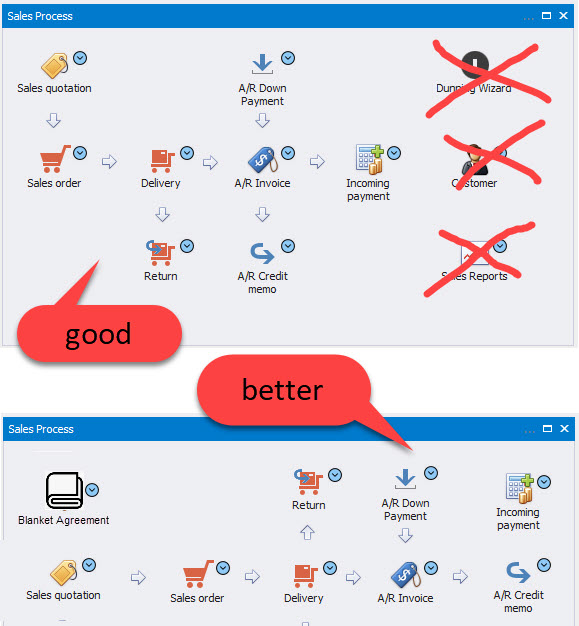
Unfortunately, you can not edit them and they waste lots of space and they are incomplete and contain Icons that not belong.
In Sales Process Widgets: Dunning Wizard, Customer and Sales Report could be added by the User as COMMON WIDGET, if needed.
If you put them differently, they would take 2 Rows instead of 3 and you could also add BLANKET AGREEMENT. (see attachment)
Maybe you could also add RETURN REQUEST and DP REQUEST (Instead of INCOMING PAYMENT).
Colored Arrows would also make it easier for new Users, e.g.:
if only COPY TO possible: green
if only COPY FROM possible: blue
if both possible: cyan
Comentarios
4 comentarios
(Please note that as we are user-driven we can't guarantee that your request will be met unless it gets many votes and/or fit the product vision)
Read more about the Feature Request process here
[Internal Id: 14161]
Hi Michael,
Please reupload the image as it is failing to display.
But in general, these widgets are to help people transition from Fiori widgets so they have been designed to look and feel very similar.
We can add some of the extra types you suggested, but we won't take any of the existing ones away.
For customizeability please vote on this request
https://support.boyum-it.com/hc/en-us/community/posts/360029680333-Make-Process-Flow-Widgets-Customizable
Hi Ronni,
what about copying the Widget to FIORI SALES WIDGET and COMPACT SALES WIDGET?
Process Flows will be editable in B1UP 2020.05
Iniciar sesión para dejar un comentario.