Terminal applications are missing Respondida

Dear support,
I am testing the newest beas release (9.3 (2.83) PL:02 HF:4) ) on SAP 9.3 PL11 and I am missing the terminal applications. So when I log in with user the windows is empty.
The access group correct, All the settings has not been changed. In the production server with beas Beas 9.2 (5.53) PL: 05 HF:5 works fine.
Am I missing something about the licensing ? Or something has been changed ?
Thanks in advance,
Comentarios
9 comentarios
Hi Peter,
you're right this is because of new license concept.
This is new from beas 9.3 PL01, you cannot use anymore user with beas basic to use beas apps modules.
Here you can see groups and license modules
https://support.boyum-it.com/hc/en-us/articles/360001675848-Apps-groups-and-license
Hi Peter,
yes, the license control can be the reason
Please check, if you've a license for all this apps
Hi Martin,
Thanks for the info.
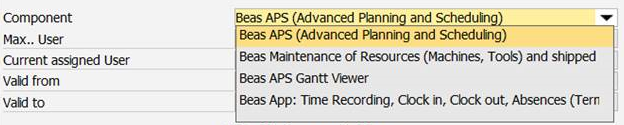 So the module: Beas App: time recording,Clock in, Clock out, etc.... will not covcer the terminal apps ? right?
This is our actual licensed modules.
From which Beas version do we have those changes ?
You wrote: on production server
Means: You test this on another server / database. Correct?
It's not enough to see the entries in dropdown list. The license must be active.
On the production server we have the SAP 9.2 PL 08, Beas 9.2 (5.53) PL: 05 HF:5
We are planing to upgrade the SAP to SAP 9.3 PL11 so I have a test server with SAP 9.3 PL11 and Beas: 9.3 (2.83) PL:02 HF:4 installed for testing.
On the production server is fine - we are using those web apps from a long time....
On the test server is not working, and probably because of the licensing...
Could you tell from which Beas version do we have those changes ?
Here is the drop-down list.
Hello, Peter.
I have the same problem with the terminals.
Did you manage to solve?
Hi Carlos,
Yes, We had to purchase a license for the Beas App: Production Data Collection, Start, Interrupt, Completion, Finished Goods, Scrap as Patrik described in this post.
Peter
Já temos essa licença aqui na empresa e ainda temos o mesmo problema!
Ao acessar as funções do terminal para adicionar ou remover aplicativos, dê o erro abaixo. Quando entro no terminal com o código do desenvolvedor, as funções não aparecem.
Erro:
() ** ^ Erro durante a exibição do relatório: Selecione Erro: SQLSTATE = 37000 [Microsoft] [Driver do ODBC SQL Server] [SQL Server] 'concat' não é um nome de função interno reconhecido. Sintaxe SQL: SELECIONE OS MELHORES 99999 "BEAS_MENU_ENTRY". "PosID", "BEAS_MENU_ENTRY". "PROGRAMID", caso em que Coalesce ("BEAS_MENU_ENTRY". "REQUESTID", '') = '' e depois em "BEUE_WEBWINDOT". (selecione min ("DESCRIÇÃO") em "BEAS_WEBOBJECTS" ou em que o. "PROGRAMID" = "BEAS_WEBWINDOW". "PROGRAMID" e o. "WINDOWNAME" = "BEAS_WEBWINDOW". "WINDOWNAME" e o. "OBJECTNAME" = "BEAS_MEN "." REQUESTID ") termina como beas_webwindow_menuetext," BEAS_MENU_ENTRY "." REQUESTID ","
I have tried to add different apps from that group, and it was working fine.
Don't you have a special character in the names somewhere ?
Iniciar sesión para dejar un comentario.